
Removing and installing satellite aerial R170
- Make
- Volkswagen
- Model
- Golf Mk6 Estate
- Year
- 2009–2013
- Section
- Aerial systems, saloon › Removing and installing satellite aerial R170
Removing and installing satellite aerial R170
Switch off ignition and all electrical loads, and pull out ignition key.
Lower moulded headliner at rear General body repairs, interiorRep. gr.70Roof trims; Removing and installing moulded headliner in saloon.
Depending on the level of equipment, the satellite aerial R170 has 2 to 4 aerial wires. These are fixed on the roof cross member.
Remove foam pad ( 5).
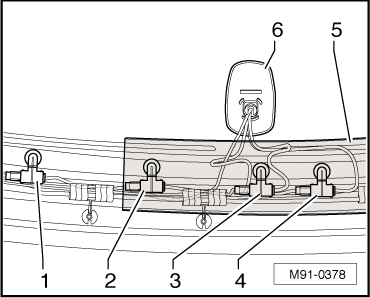
Release and disconnect connectors (1) to (4), and move aerial wiring clear as far as satellite aerial R170(6).
Unscrew nut (2), and remove satellite aerial R170 upwards.
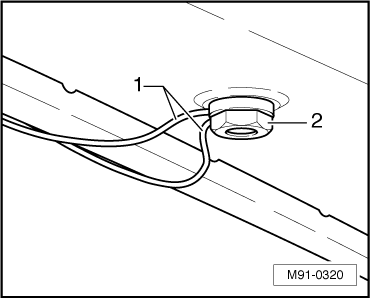
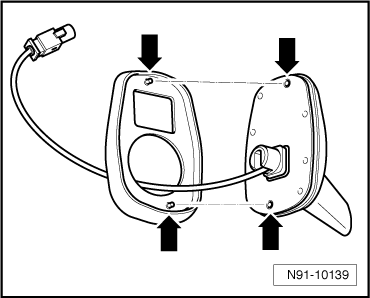
Installation is carried out in the reverse order. When installing observe the following:
When positioning the roof aerial for installation, ensure that the seal is seated correctly. The two guide lugs of the seal must be located in the relevant holes (arrows) of the aerial base.
After positioning roof aerial, make sure aerial wires (1) are correctly routed through wiring hole in securing nut (2).
- Chapter“Overview of fitting locations – aerial systems, saloon”
Parts & tools for this job For 2009 Volkswagen Golf
- TOOLDigital multimeterSearch: automotive digital multimeter
- PARTAssorted fuse kitSearch: car fuse assortment kit
- TOOLWire crimper and connector kitSearch: wire crimper connector kit
As an Amazon Associate we earn from qualifying purchases.