
Removing and installing CD changer R41
- Make
- Volkswagen
- Model
- Golf Mk6 Estate
- Year
- 2009–2013
- Section
- CD changer R41 › Removing and installing CD changer R41
Electrical: CommunicationRemoving and installing CD changer R41
Removing and installing CD changer R41
The CD changer R41 is installed in the centre console.
Special tools and workshop equipment requiredRadio release tool VAS 3316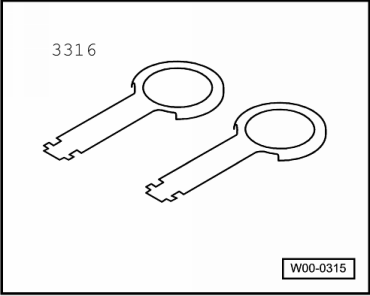
The CD changer R41 can be checked before it is removed → Chapter.
Open centre armrest.
Remove any CDs left in the device Operating manual.
Switch off ignition and all electrical loads, and pull out ignition key.
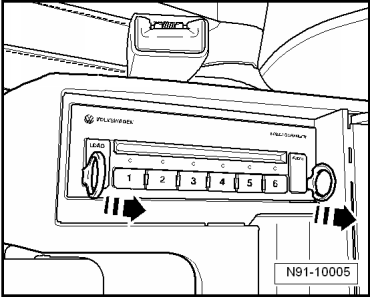
Push radio release tool VAS 3316 into dedicated slots on left and right of CD changer R41 until they engage audibly.
Using radio release tool VAS 3316, pull out CD changer R41(arrows).
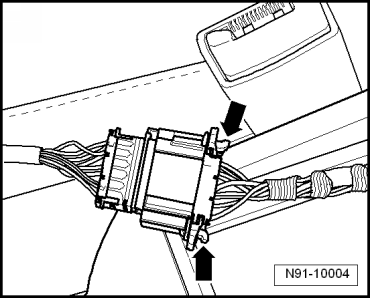
Release connector at points marked with (arrows) and pull off.
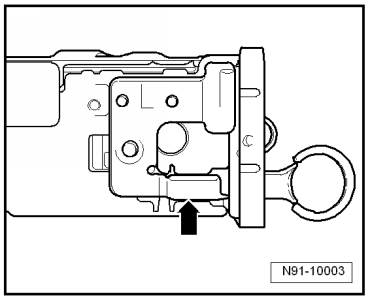
Press locking clip (arrow) and pull out radio release tool VAS 3316 when doing so.
Installation is carried out in reverse order of removal.
Parts & tools for this job For 2009 Volkswagen Golf
- TOOLDigital multimeterSearch: automotive digital multimeter
- PARTAssorted fuse kitSearch: car fuse assortment kit
- TOOLWire crimper and connector kitSearch: wire crimper connector kit
As an Amazon Associate we earn from qualifying purchases.