
Removing and installing brake pedal
- Make
- Volkswagen
- Model
- Golf Mk7 Estate
- Year
- 2013–2020
- Section
- Brake pedal › Removing and installing brake pedal
Removing and installing brake pedal
It is not possible to remove the brake pedal individually from vehicle.
First, remove mounting bracket → Chapter.
Note
- Removing brake pedal with mounting bracket removed
Turn pivot pin clockwise in direction indicated by (arrow).
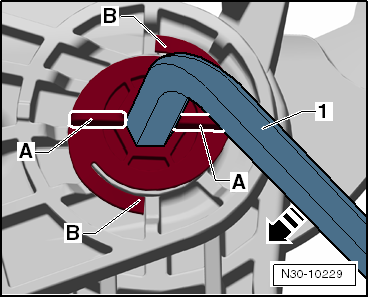
(1) = 14 mm hex socket wrench
Note
- This action will break off the tabs (B). Renew the pivot pin.
Remove securing clip from pivot pin.
Pull out pivot pin towards right.
Remove brake pedal from mounting bracket.
Install in reverse order. Note the following points:
Note
- Renew pivot pin and securing clip.
Note
- Do not lubricate or grease the pivot pin. The pivot pin must remain dry.
Insert brake pedal into mounting bracket.
Slide pivot pin from right to left through mounting bracket and brake pedal.
Fit securing clip to pivot pin.
Turn pivot pin anti-clockwise in direction indicated by (motion arrow) until tabs (A) engage audibly on stop in mounting bracket.
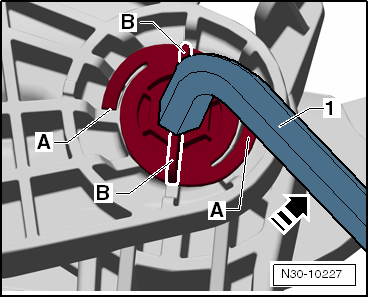
Install pedal cluster and mounting bracket → Chapter.
Parts & tools for this job For 2013 Volkswagen Golf
- PARTBrake padsSearch: Volkswagen Golf 2013 brake pads
- TOOLBrake bleeder kitSearch: one man brake bleeder kit
- FLUIDBrake fluidSearch: brake fluid
As an Amazon Associate we earn from qualifying purchases.