
Removing and installing front footwell light K269, front passenger side
- Make
- Volkswagen
- Model
- Golf Mk7 Estate
- Year
- 2013–2020
- Section
- Lights › Removing and installing front footwell light K269, front passenger side
‹ Prev Removing and installing front footwell light K268, driver sideNext › Removing and installing front footwell illumination bulb L151/ L152
Electrical systemRemoving and installing front footwell light K269, front passenger side
Removing and installing front footwell light K269, front passenger side
If an LED footwell light is faulty, the entire light must be renewed.
Switch off ignition and all electrical consumers.
Remove ignition key, if inserted.
Using a flat screwdriver, press in locking lug (1) at point indicated by arrow (A).
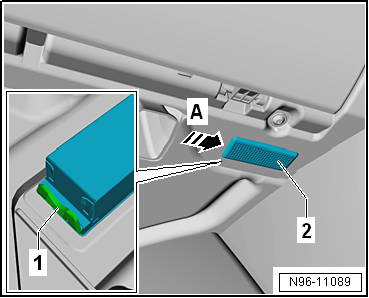
Lever out footwell light (2).
Release connector and disconnect.
Installation is carried out in the reverse sequence.
Test functionality.
‹ Prev Removing and installing front footwell light K268, driver sideNext › Removing and installing front footwell illumination bulb L151/ L152
Parts & tools for this job For 2013 Volkswagen Golf
- TOOLDigital multimeterSearch: automotive digital multimeter
- PARTAssorted fuse kitSearch: car fuse assortment kit
- TOOLWire crimper and connector kitSearch: wire crimper connector kit
As an Amazon Associate we earn from qualifying purchases.