
Removing and installing tail light
- Make
- Volkswagen
- Model
- Golf Mk7 Estate
- Year
- 2013–2020
- Section
- Tail lights › Removing and installing tail light
‹ Prev Adjusting installation position of tail lightNext › Removing and installing tail light bulb M2/ M4
Electrical systemRemoving and installing tail light
Removing and installing tail light
Note
- Removal and installation are described for the left side. Removal and installation on the right side are carried out in the same way.
Turn light switch to “0” position.
Open cover in luggage compartment side trim panel.
Unscrew securing element (1).
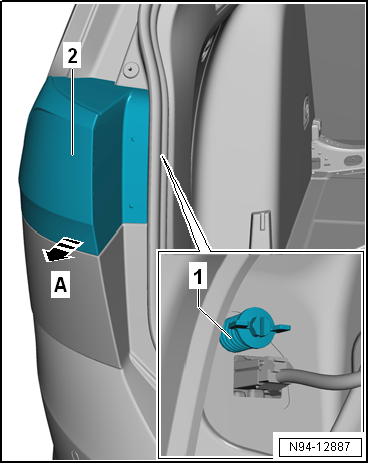
Disconnect electrical connector.
Remove tail light (2) in direction of arrow (A).
Install in the reverse order of removal observing the following:
Test functionality.
- Chapter“Assembly overview - tail lights in body”
‹ Prev Adjusting installation position of tail lightNext › Removing and installing tail light bulb M2/ M4
Parts & tools for this job For 2013 Volkswagen Golf
- TOOLDigital multimeterSearch: automotive digital multimeter
- PARTAssorted fuse kitSearch: car fuse assortment kit
- TOOLWire crimper and connector kitSearch: wire crimper connector kit
As an Amazon Associate we earn from qualifying purchases.