
Removing and installing net partition mounting
- Make
- Volkswagen
- Model
- Golf Mk7 Estate
- Year
- 2013–2020
- Section
- Equipment › Removing and installing net partition mounting
‹ Prev Removing and installing net partitionNext › Removing and installing bracket for net partition
General body repairs, interiorRemoving and installing net partition mounting
Removing and installing net partition mounting
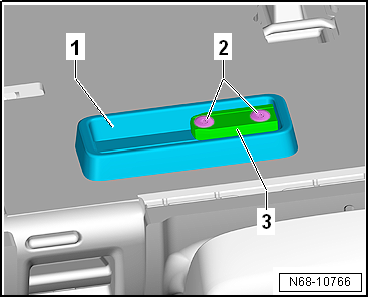
Remove net partition → Chapter.
Remove bolts (2).
Remove insert (3) and mounting (1) from right rear seat backrest (2/3).
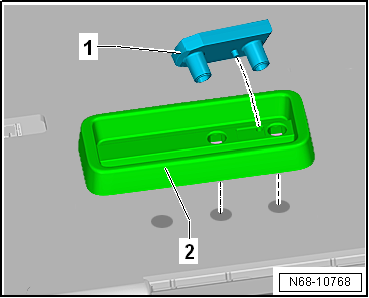
Install in reverse order, but note the following:
Note
- Note installation position of insert (1) and mounting (2).
- Secure mounting (2) in left threaded holes.
- Fit locating lug on insert (1) into recess in mounting (2).
- Clean remnants of locking fluid from thread with a wire brush. Then, fit bolts using locking fluid (Electronic Parts Catalogue ).
- Also clean locking fluid from threaded holes (e.g. using thread chaser).
- Chapter“Assembly overview- net partition”
‹ Prev Removing and installing net partitionNext › Removing and installing bracket for net partition
Parts & tools for this job For 2013 Volkswagen Golf
- TOOLTrim removal tool kitSearch: trim removal tool kit
- PARTTouch-up paintSearch: Volkswagen touch up paint
- PARTPanel clip assortmentSearch: Volkswagen panel clips assortment
As an Amazon Associate we earn from qualifying purchases.