
Removing and installing infotainment system display
- Make
- Volkswagen
- Model
- Golf Mk7
- Year
- 2013–2020
- Section
- Infotainment system › Removing and installing infotainment system display
Removing and installing infotainment system display
Special tools and workshop equipment requiredRemoval wedge 3409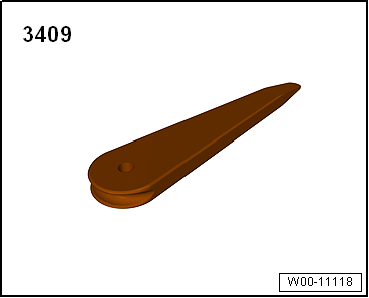
Switch off ignition and all electrical consumers, and remove ignition key.
Warning Danger of damage to component surfaces.
- When using leverage tools, mask visible areas of the component with commercially available adhesive tape.
Remove centre dash panel trim General body repairs, interiorRep. gr.70Dash panel; Assembly overview - dash panel
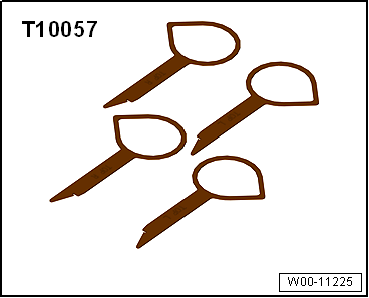
Insert radio release tools T10057 into slots (1) in display unit for control device of front display and information control panel J685.
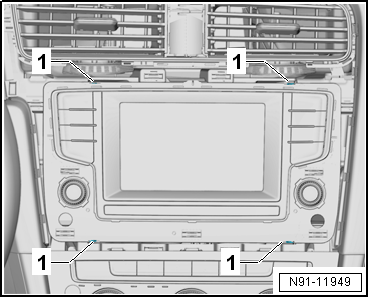
Release upper locking mechanisms (1) by pressing them in direction of travel.
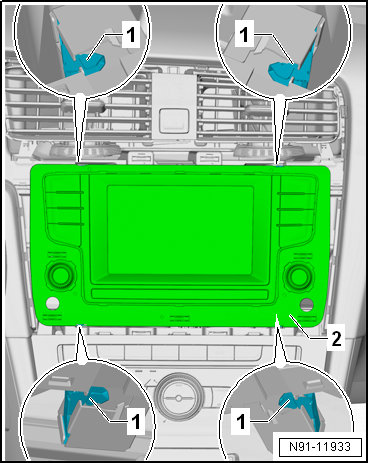
Release lower locking mechanisms (1) by pressing them in direction of travel.
Remove display unit for control device of front display and information control panel J685(2).
Release and detach connectors.
Install in the reverse order of removal. When doing this, note the following:
Warning Danger of damage to components.
- When inserting display unit for control device of front display and information control panel J685 do not press on the display and the control elements.
Press in display unit for control device of front display and information control panel J685 until it engages.
Parts & tools for this job For 2013 Volkswagen Golf
- TOOLDigital multimeterSearch: automotive digital multimeter
- PARTAssorted fuse kitSearch: car fuse assortment kit
- TOOLWire crimper and connector kitSearch: wire crimper connector kit
As an Amazon Associate we earn from qualifying purchases.