
Removing and installing TV tuner, Golf
- Make
- Volkswagen
- Model
- Golf Mk7
- Year
- 2013–2020
- Section
- TV system › Removing and installing TV tuner, Golf
Removing and installing TV tuner, Golf
Special tools and workshop equipment requiredProtective cap for wiring harness connector VAS 6223/9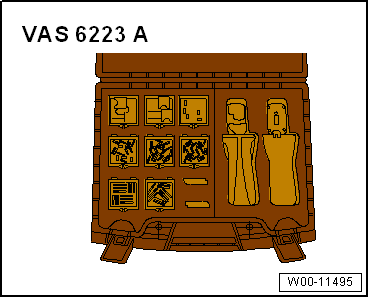
If the control unit is replaced, select the Replace function of the respective control unit in Guided fault findingVehicle diagnostic tester.
Move front seat to rearmost using longitudinal adjustment mechanism and raise to highest position.
Switch off ignition and all electrical consumers, and remove ignition key.
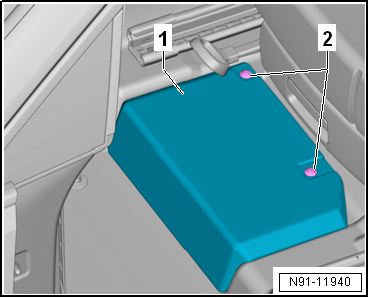
Pull out spreader rivets (2), slide cover (1) straight in direction of travel and remove it.
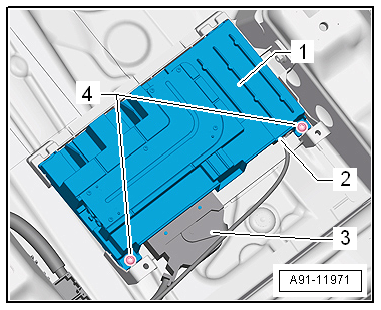
Release connector (2) on digital TV tuner R171(1) and separate.
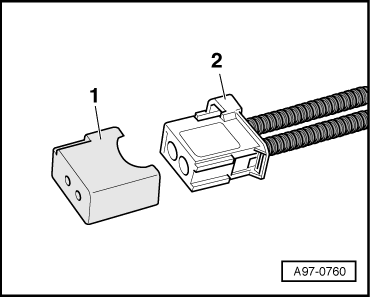
Push protective cap for cable connector VAS 6223/9(1) onto connector of MOST bus (2).
Release connector (3) on digital TV tuner R171(1) and separate.
Remove bolts (4).
Swing digital TV tuner R171(1) out of bracket.
Install in the reverse order of removal. When doing this, note the following:
Note
- When installing, ensure that the digital TV tuner R171 is seated correctly in the groove in the retainer.
- When installing the cover, ensure that it is properly fitted on the front edge of the retainer.
Parts & tools for this job For 2013 Volkswagen Golf
- TOOLDigital multimeterSearch: automotive digital multimeter
- PARTAssorted fuse kitSearch: car fuse assortment kit
- TOOLWire crimper and connector kitSearch: wire crimper connector kit
As an Amazon Associate we earn from qualifying purchases.