
Removing and installing data bus diagnostic interface J533
- Make
- Volkswagen
- Model
- Golf Mk7
- Year
- 2013–2020
- Section
- Control units › Removing and installing data bus diagnostic interface J533
‹ Prev Removing and installing onboard supply control unit J519, RHD vehiclesNext › Removing and installing bracket for onboard supply control unit J519
Electrical systemRemoving and installing data bus diagnostic interface J533
Removing and installing data bus diagnostic interface J533
Note
- When renewing the control unit, select Renew function for the respective control unit in Guided Fault Finding or Guided Functions mode Vehicle diagnostic tester.
Unplug electrical connector (1) by reaching upwards behind pedal bracket.
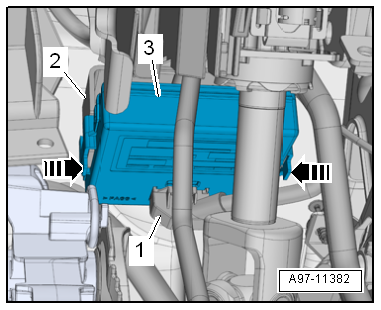
Press locking detent to disconnect and pull off connectors.
Disengage catches (arrows).
Pull data bus diagnostic interface J533(3) downwards off bracket (2).
Install in the reverse order of removal, observing the following:
- Chapter“Assembly overview - data bus diagnostic interface”
‹ Prev Removing and installing onboard supply control unit J519, RHD vehiclesNext › Removing and installing bracket for onboard supply control unit J519
Parts & tools for this job For 2013 Volkswagen Golf
- TOOLOBD2 scannerSearch: OBD2 scanner
- TOOLDigital multimeterSearch: automotive digital multimeter
- TOOLBack-probe test leadsSearch: back probe test leads
As an Amazon Associate we earn from qualifying purchases.