
Removing and installing electromechanical parking brake button E538/auto-hold button E540
- Make
- Volkswagen
- Model
- Golf Mk7
- Year
- 2013–2020
- Section
- Controls › Removing and installing electromechanical parking brake button E538/auto-hold button E540
‹ Prev Removing and installing rear door contact switches F10/ F11Next › Removing and installing the starter button E378
Electrical systemRemoving and installing electromechanical parking brake button E538/auto-hold button E540
Removing and installing electromechanical parking brake button E538/auto-hold button E540
Note
- The electromechanical parking brake button E538 and the auto-hold button E540 are combined to form one component and cannot be separated.
- The removal and installation procedures are described for LHD vehicles. Removal and installation for RHD vehicles are similar.
Remove centre console insert General body repairs, interiorRep. gr.68Centre console; Removing and installing centre console insert.
Press fasteners in direction of arrow (A).
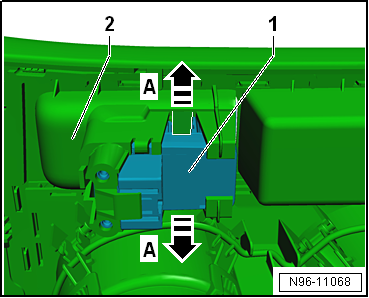
Remove electromechanical parking brake button E538(1) up and out of centre console insert (2).
Installation is carried out in the reverse sequence.
Test functionality.
‹ Prev Removing and installing rear door contact switches F10/ F11Next › Removing and installing the starter button E378
Parts & tools for this job For 2013 Volkswagen Golf
- PARTBrake padsSearch: Volkswagen Golf 2013 brake pads
- TOOLBrake bleeder kitSearch: one man brake bleeder kit
- FLUIDBrake fluidSearch: brake fluid
As an Amazon Associate we earn from qualifying purchases.