
Removing and installing front footwell light K269, front passenger side
- Make
- Volkswagen
- Model
- Golf Mk7
- Year
- 2013–2020
- Section
- Lights › Removing and installing front footwell light K269, front passenger side
‹ Prev Removing and installing front footwell light K268, driver sideNext › Removing and installing front footwell illumination bulb L151/ L152
Electrical systemRemoving and installing front footwell light K269, front passenger side
Removing and installing front footwell light K269, front passenger side
Using a flat screwdriver, press in locking lug (1) at point indicated by arrow (A).
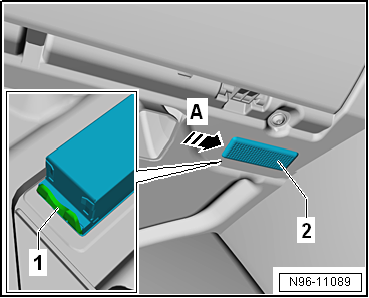
Lever out footwell light (2).
Disconnect electrical connector.
Installation is carried out in the reverse sequence.
Note
- If an LED-operated footwell light is defective, the entire light must be renewed.
Test functionality.
‹ Prev Removing and installing front footwell light K268, driver sideNext › Removing and installing front footwell illumination bulb L151/ L152
Parts & tools for this job For 2013 Volkswagen Golf
- TOOLDigital multimeterSearch: automotive digital multimeter
- PARTAssorted fuse kitSearch: car fuse assortment kit
- TOOLWire crimper and connector kitSearch: wire crimper connector kit
As an Amazon Associate we earn from qualifying purchases.