
Removing dual clutch
- Make
- Volkswagen
- Model
- Golf Plus
- Year
- 2005–2014
- Section
- Clutch › Removing dual clutch
6-speed dual clutch gearbox 02ERemoving dual clutch
Removing dual clutch
To remove or install clutch, gearbox must be securely attached to an assembly stand in vertical position. Only in this way it is possible later to adjust the axial clearance of the new clutch without error.
Remove clutch end cover → Chapter.
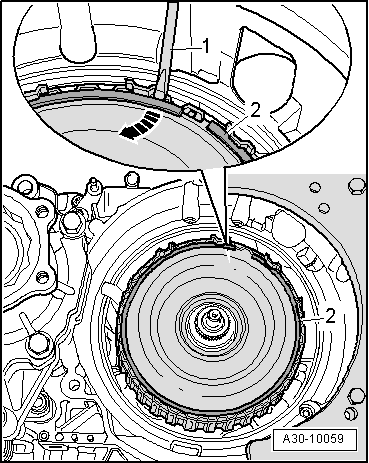
Lever out retaining ring (2) of drive plate using screwdriver (1)(arrow).
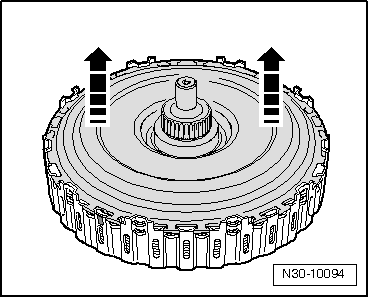
Remove drive plate (arrows).
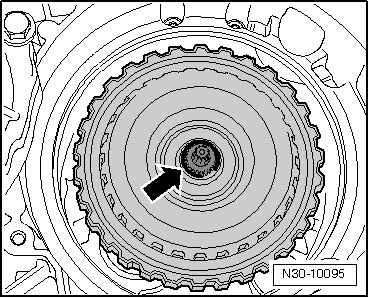
Remove and dispose of retaining ring (arrow).
Note
- During installation a new retaining ring must be measured and fitted.
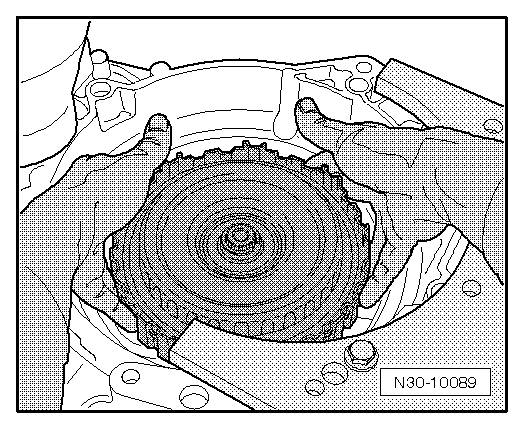
Warning Carefully remove the dual clutch. Take care that no parts fall out. Therefore, do not turn the clutch over!
Remove dual clutch.
Remove pump shaft (A).
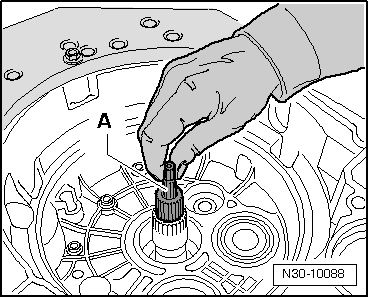
Pump shaft is not inserted until after new clutch is installed. Set shaft aside until then.
Install dual clutch → Chapter
Parts & tools for this job For 2005 Volkswagen Golf
- PARTClutch kitSearch: Volkswagen Golf 2005 clutch kit
- TOOLClutch alignment toolSearch: clutch alignment tool
- FLUIDGear oilSearch: Volkswagen Golf manual gearbox oil
As an Amazon Associate we earn from qualifying purchases.