
Installing:
- Make
- Volkswagen
- Model
- Golf Plus
- Year
- 2005–2014
- Section
- Radio units and radio navigation systems in general › Installing:
Electrical: CommunicationInstalling:
Installing:
Plug connectors onto radio or radio navigation system and lock them.
Insert radio or radio navigation system in dash panel without canting.
Note
- Never press against display or operating buttons when fitting radio or radio navigation system, for this may damage unit.
Secure radio or radio navigation system in place using the four bolts (arrows).
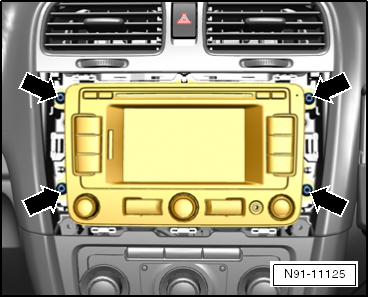
Install centre console cover again.
If necessary, deactivate anti-theft coding:
- Radio system “RCD 210”Chapter
- Radio system “RCD 310”Chapter
- Radio system “RCD 510”Chapter
- Radio navigation system “RNS 310”Chapter
- Radio navigation system “RNS 510”Chapter
Check radio or radio navigation system code and recode as necessary.
Coding radio or radio navigation system ⇒ Adapting radio components → Chapter
Coding radio or radio navigation system ⇒ Adapting radio navigation system components → Chapter
Parts & tools for this job For 2005 Volkswagen Golf
- TOOLDigital multimeterSearch: automotive digital multimeter
- PARTAssorted fuse kitSearch: car fuse assortment kit
- TOOLWire crimper and connector kitSearch: wire crimper connector kit
As an Amazon Associate we earn from qualifying purchases.