
Removing:
- Make
- Volkswagen
- Model
- Golf Plus
- Year
- 2005–2014
- Section
- Radio units and radio navigation systems in general › Removing:
Removing:
Note
- Read respective chapter for unit when removing and installing.
- Radio system “RCD 300”Chapter
- Radio system “RCD 310”Chapter
- Radio system “RCD 500”Chapter
- Radio system “RCD 510”Chapter
- Radio navigation system “RNS 300”Chapter
- Radio navigation system “RNS MFD 2 and DVD”Chapter
- Radio navigation system “RNS 510”Chapter
Before beginning dismantling work, perform the following steps:
Remove any CDs which may be in unit Operating manual.
Switch off ignition and all electrical consumers and remove ignition key.
Carry out procedure as follows:
Remove trim from centre of dash panel General body repairs, interiorRep. gr.68Compartments, covers and trim; Trim; Removing and installing trim in centre of dash panel.
Remove bolts (arrows) in radio unit.
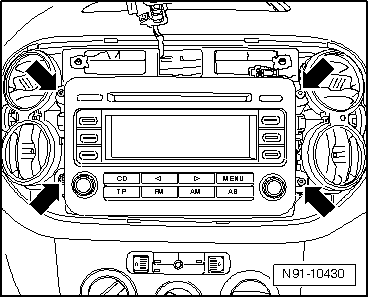
Pull radio unit out of slot far enough to be able to reach connector on back of radio unit.
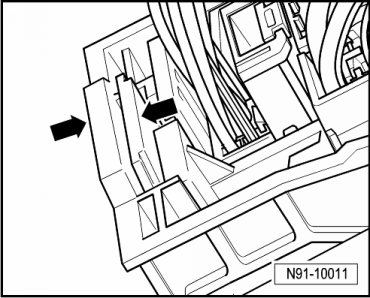
Press together connector locking mechanism in direction of (arrows).
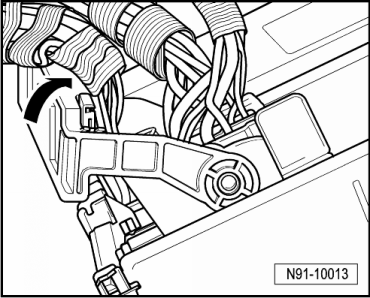
Then swing locking bar up in direction of (arrow) and disconnect connector.
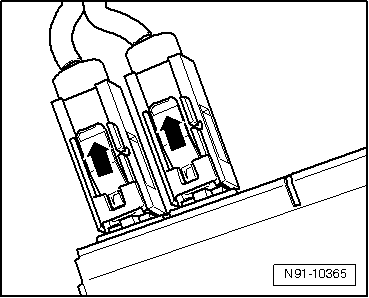
Release connectors (arrows) from aerial connections and disconnect them.
Parts & tools for this job For 2005 Volkswagen Golf
- TOOLDigital multimeterSearch: automotive digital multimeter
- PARTAssorted fuse kitSearch: car fuse assortment kit
- TOOLWire crimper and connector kitSearch: wire crimper connector kit
As an Amazon Associate we earn from qualifying purchases.