
Removing and installing fog light
- Make
- Volkswagen
- Model
- Golf Plus
- Year
- 2005–2014
- Section
- Fog lights › Removing and installing fog light
‹ Prev Assembly overview - fog lightsNext › Removing and installing fog light / static cornering light bulb
Electrical systemRemoving and installing fog light
Removing and installing fog light
Note
- The illustrations show removal and installation of the front left fog light.
Switch off ignition and all electrical consumers and remove ignition key.
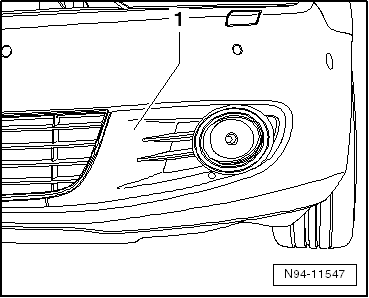
Unclip cover cap (1) from retainers.
Remove securing bolt (arrow).
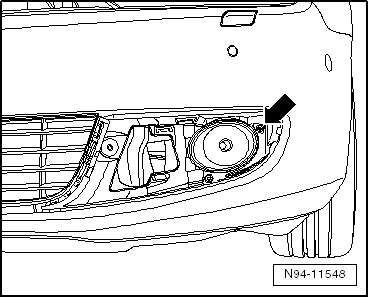
Swing fog light housing out of bumper cover taking connected wiring length into consideration.
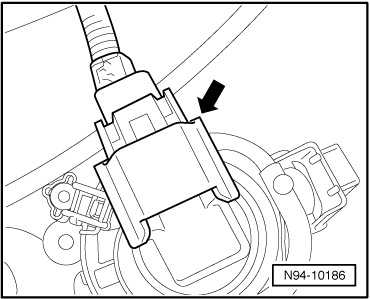
Release and disconnect connector (arrow) and remove fog light housing.
Installation is carried out in the reverse order. When installing observe the following:
Check function of headlight.
Check fog light settings and adjust if necessary MaintenanceBookletDescriptions of work.
‹ Prev Assembly overview - fog lightsNext › Removing and installing fog light / static cornering light bulb
Parts & tools for this job For 2005 Volkswagen Golf
- TOOLDigital multimeterSearch: automotive digital multimeter
- PARTAssorted fuse kitSearch: car fuse assortment kit
- TOOLWire crimper and connector kitSearch: wire crimper connector kit
As an Amazon Associate we earn from qualifying purchases.