
Removing and installing rear parking aid senders
- Make
- Volkswagen
- Model
- Golf Plus
- Year
- 2005–2014
- Section
- Parking aid › Removing and installing rear parking aid senders
‹ Prev Removing and installing parking aid control unit J446Next › Removing and installing parking aid warning buzzer H15
Electrical systemRemoving and installing rear parking aid senders
Removing and installing rear parking aid senders
The following four senders are located in the rear bumper cover:
- Rear left parking aid sender G203
- Rear left centre parking aid sender G204
- Rear right centre parking aid sender G205
- Rear right parking aid sender G206
The four parking aid senders are identical, only the retainers for the parking aid senders differ → Chapter.
Note
- Removal and installation of the parking aid senders is carried out in the same way for all senders and is described as follows for just one sender.
- In the first software version of parking aid control unit J446, the sender designations may differ slightly on the display due to different software versions. In this case allocation is as follows:
- Rear centre left parking aid sender G204 is rear left parking aid sender G203
- Rear left inner parking aid sender G334 is rear centre left parking aid sender G204
- Rear right inner parking aid sensor G335 is rear centre right parking aid sender G205
- Rear centre right parking aid sender G205 is rear right parking aid sender G206
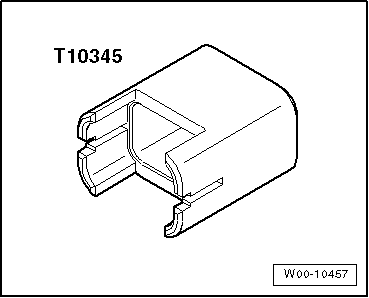
Switch off ignition and all electrical consumers and remove ignition key.
Remove rear bumper cover General body repairs, exteriorRep. gr.63Rear bumper
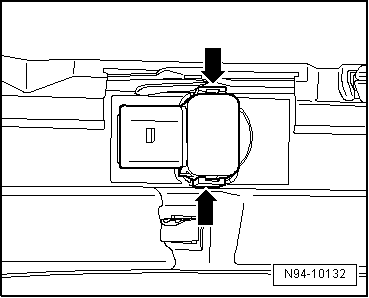
Release locking lugs (arrows) using release tool T10345 and pull sender with connector still joined out of bumper cover.
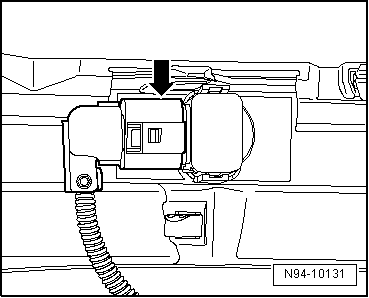
Disconnect connector (arrow) when removed.
Installation is carried out in reverse order of removal.
‹ Prev Removing and installing parking aid control unit J446Next › Removing and installing parking aid warning buzzer H15
Parts & tools for this job For 2005 Volkswagen Golf
- TOOLDigital multimeterSearch: automotive digital multimeter
- PARTAssorted fuse kitSearch: car fuse assortment kit
- TOOLWire crimper and connector kitSearch: wire crimper connector kit
As an Amazon Associate we earn from qualifying purchases.