
Removing and installing turn signal switch
- Make
- Volkswagen
- Model
- Golf Plus
- Year
- 2005–2014
- Section
- Steering column switch › Removing and installing turn signal switch
Removing and installing turn signal switch
Warning The removal and installation of individual components of the steering column switch must be performed in a specified sequence → Chapter.
Note
- The “turn signal switch” comprises of the following components: turn signal switch E2, headlight dipper and flasher switch E4 and, if fitted with cruise control system, cruise control system switch E45.
- For reasons of clarity, the steering column switch is shown with CCS switch E45 in the illustration.
Disconnect battery → Chapter.
Remove driver airbag General body repairs, interiorRep. gr.69Airbag; Removing and installing driver airbag.
Remove steering wheel Running gear, axles, steeringRep. gr.48Assembly overview - steering column; Removing and installing steering wheel; Removing.
Remove steering column trim General body repairs, interiorRep. gr.68Compartments, covers and trim; Removing and installing steering column trim.
Remove steering column electronics control unit J527Chapter.
Remove airbag coil connector and return ring with slip ring F138Chapter.
Remove steering angle sensor G85Chapter.
Release retaining clips (arrows) using 1.0 mm feeler gauge (1) and remove “turn signal switch” towards rear of vehicle.
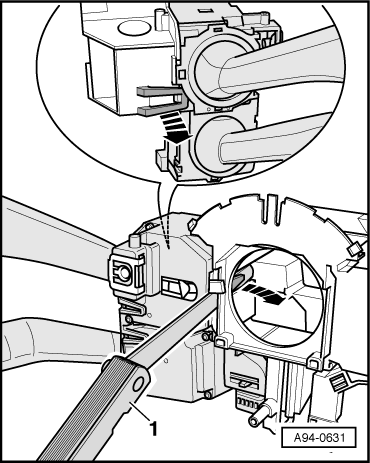
Installation is carried out in the reverse order. When installing observe the following:
Note
- The “turn signal switch” should be heard to engage.
Parts & tools for this job For 2005 Volkswagen Golf
- TOOLOBD2 scannerSearch: OBD2 scanner
- TOOLDigital multimeterSearch: automotive digital multimeter
- TOOLBack-probe test leadsSearch: back probe test leads
As an Amazon Associate we earn from qualifying purchases.