
Removing
- Make
- Volkswagen
- Model
- Golf Plus
- Year
- 2005–2014
- Section
- Mouldings and trims › Removing
General body repairs, exteriorRemoving
Removing
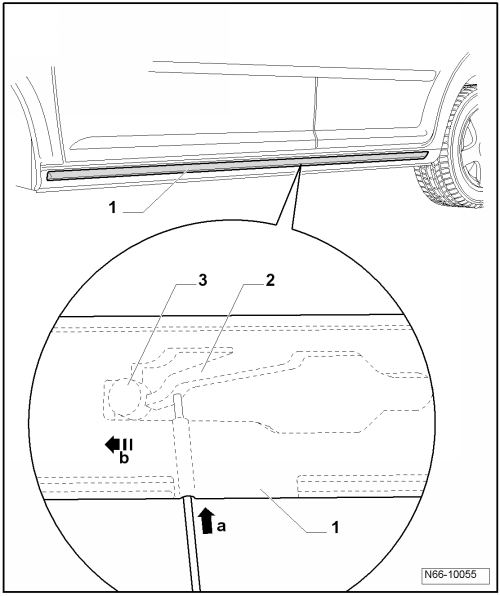
Guide a small screwdriver through the opening in the side trim from below and release the locking device (2) by pressing screwdriver upwards (arrow a).
Slide stone-chip protection trim (1) forwards (arrow b) until screwdriver contacts securing screw (3). Now pull screwdriver out. Slide stone-chip protection trim further until it can be removed from all securing screws.
Parts & tools for this job For 2005 Volkswagen Golf
- TOOLTrim removal tool kitSearch: trim removal tool kit
- PARTTouch-up paintSearch: Volkswagen touch up paint
- PARTPanel clip assortmentSearch: Volkswagen panel clips assortment
As an Amazon Associate we earn from qualifying purchases.