
Removing and installing glove compartment light switch E26
- Make
- Volkswagen
- Model
- Golf Sportsvan
- Year
- 2014–2020
- Section
- Controls › Removing and installing glove compartment light switch E26
‹ Prev Removing and installing buttons for seat heating E653/ E654Next › Removing and installing exterior mirror adjuster EX11
Electrical systemRemoving and installing glove compartment light switch E26
Removing and installing glove compartment light switch E26
Note
- The removal and installation procedures are described for LHD vehicles. Removal and installation for RHD vehicles are similar.
Open glove compartment.
Press glove compartment stops (1) on left and right upwards (arrow).
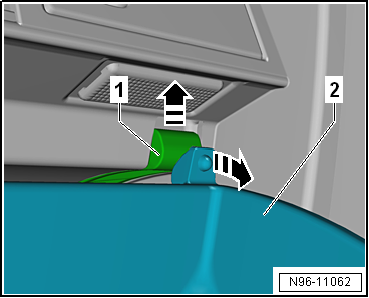
Open glove compartment cover (2) further.
Pull steering rack (2) out of damper element (1) in direction of (arrow B).
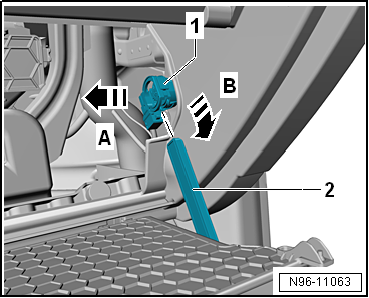
Pull glove compartment light switch E26 located in damper element (1) out of mounting in direction of (arrow A).
Installation is carried out in the reverse sequence.
‹ Prev Removing and installing buttons for seat heating E653/ E654Next › Removing and installing exterior mirror adjuster EX11
Parts & tools for this job For 2014 Volkswagen Golf
- TOOLOBD2 scannerSearch: OBD2 scanner
- TOOLDigital multimeterSearch: automotive digital multimeter
- TOOLBack-probe test leadsSearch: back probe test leads
As an Amazon Associate we earn from qualifying purchases.