
Dash panel insert: Adapting menu language
- Make
- Volkswagen
- Model
- Jetta Mk5
- Year
- 2005–2010
- Section
- Differential › Dash panel insert: Adapting menu language
Dash panel insert: Adapting menu language
The language versions can be selected via the main menu on display of dash panel insert.
- Select main menu for vehicles without multifunction steering wheel → Chapter.
- Select main menu for vehicles with multifunction steering wheel → Chapter.
Selecting main menu for vehicles without multifunction steering wheel
Note
- The selection of menus shown in the display will depend on the vehicle electronics and the scope of equipment.
Switch on ignition.
A vehicle symbol is displayed.
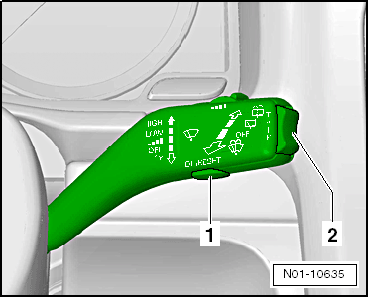
Press button (1) in windscreen wiper lever once.
To switch to the main menu from another menu press and hold rocker (2) for two seconds.
Repeat this procedure until the main menu appears.
Press rocker (2) up or down to mark a menu point.
The marked menu option is found between the two horizontal lines. Additionally there is a triangle on the right.
Mark menu item “Settings”.
Press button (1) in windscreen wiper lever.
The menu “Settings” is selected.
The “Settings” menu will display the following:
Settings for timeSpeed warning for winter tyresUnitsLanguageAuxiliary heatingLight & vision and convenienceSelect menu item »Language« and confirm with button (1).
In the menu the language can be chosen.
Select desired language and confirm with button (1).
Calling-up main menu for vehicles with multifunction steering wheel, version 1
Switch on ignition.
A vehicle symbol is displayed.
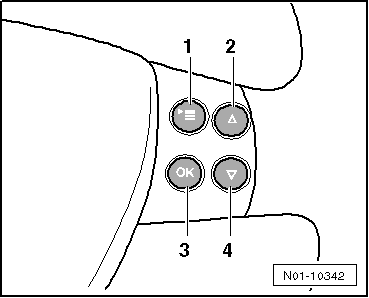
Press button (3) until the menu for “Settings” appears.
Press buttons (4) and “Language”.
Confirm with button (3).
Select relevant language.
Confirm with button (3).
Exit menu using button (1).
Calling-up main menu for vehicles with multifunction steering wheel, version 2
Switch on ignition.
A vehicle symbol is displayed.
Press button (5) and main menu will be called up.
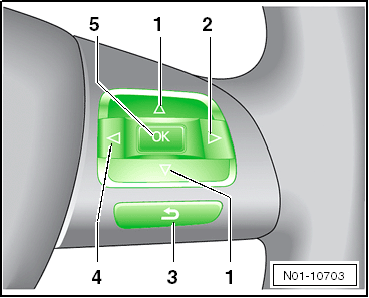
Press buttons (2) or (4) repeatedly until “Settings” menu appears
Press button (5).
Select relevant language with button (1).
Confirm with button (5).
Exit menu using button (3).
Parts & tools for this job For 2005 Volkswagen Jetta
- PARTClutch kitSearch: Volkswagen Jetta 2005 clutch kit
- TOOLClutch alignment toolSearch: clutch alignment tool
- FLUIDGear oilSearch: Volkswagen Jetta manual gearbox oil
As an Amazon Associate we earn from qualifying purchases.