
Overview - radio, RCD 310
- Make
- Volkswagen
- Model
- Jetta Mk6
- Year
- 2011–2018
- Section
- Radio › Overview - radio, RCD 310
Overview - radio, RCD 310
Radio RCD 310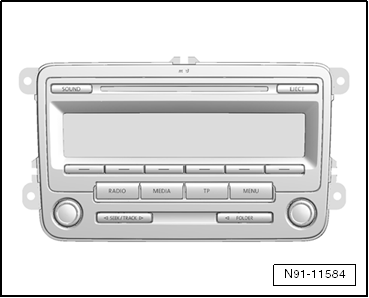
When dealing with complaints, it is absolutely necessary to understand the functions and the operation of the communication systems Operating manual.
The RCD 310 radio system has the following device features:
- 4 x 20 watt loudspeaker channels
- CD drive
- Monochrome display
- Connection for external CD changer R41
- Connection for multimedia system control unit J650
- Connection for external audio sources R199
- Universal preparation for mobile telephone (UTP) - Low (stereo input)
- Connection for external amplifier (amplifier R12)
- Optional DAB tuner integrated
- Convenience coding
- Optional support for multifunction steering wheel
- OPS (Optical Parking System) via radio display
- Air conditioning system information via radio display
Following CD formats are NOT supported:
- CD with diameter of 8 cm
- “Mixed CD” (CD with data and audio files)
The RCD 310 is capable of self-diagnosis.
Note
- Fault finding Vehicle diagnostic tester.
Repairing aerial wiring Electrical System, General InformationRep. gr.97Wiring harness and connector repair; Repairing aerial wiring.
The radio R is equipped with an anti-theft coding device, which works in combination with the dash panel insert.
If the voltage supply of the radio R is reconnected after being disconnected, the radio will be operational immediately without it being necessary to enter the anti-theft code again. The prerequisites are that initial activation of the anti-theft coding has been performed and the radio R is reconnected in the same vehicle.
The anti-theft code can be determined using Vehicle diagnostic tester. The radio card used in the past and the sticker on the radio R have been discontinued.
To determine the anti-theft code, the Vehicle diagnostic tester must be “online”. The user must have valid authorisation for the programme to request radio codes.
A locked radio R will only work again if the correct release code for the anti-theft coding system is entered.
Vehicle diagnostic tester, Guided Fault Finding, Read radio code
Your system rights are then determined. The operating data, the VIN and the unit number of the radio R are then read out automatically.
Note
- When installing new radios R, it is possible that the Vehicle diagnostic tester will not be able to read the unit number of the radio R. In this case, enter the number manually. This can be found on a sticker on the radio R unit and is also embossed on the side of the unit.
The anti-theft code which has been determined is then shown on the display of the Vehicle diagnostic tester.
The anti-theft code is entered in the radio R manually.
Switch on radio R.
The word “SAFE” appears for approx. 10 seconds on the display and then number sequence “1000”.
Enter anti-theft code by pressing relevant function buttons repeatedly until correct sequence of digits is displayed.
After entering the four-digit anti-theft code, “OK” appears on the display.
Once you have entered the correct anti-theft code, confirm with the “OK” function button on the display.
The radio R will be released and is ready for use.
If you entered an incorrect anti-theft code, this can be corrected immediately in a new attempt. If a wrong anti-theft code has been entered twice, the radio R will be blocked for one hour. In this case, leave radio R and ignition switched on. The process for deactivating the anti-theft coding can then be repeated after one hour.
N.B. Only two attempts to enter the code are allowed, after which the radio R will be blocked for one hour.
Parts & tools for this job For 2011 Volkswagen Jetta
- TOOLDigital multimeterSearch: automotive digital multimeter
- PARTAssorted fuse kitSearch: car fuse assortment kit
- TOOLWire crimper and connector kitSearch: wire crimper connector kit
As an Amazon Associate we earn from qualifying purchases.