
Removing and installing hazard warning light button E229
- Make
- Volkswagen
- Model
- Jetta Mk6
- Year
- 2011–2018
- Section
- Controls › Removing and installing hazard warning light button E229
‹ Prev Removing and installing warning lamp for airbag deactivated on front passenger side K145Next › Removing and installing glove compartment light switch E26
Electrical systemRemoving and installing hazard warning light button E229
Removing and installing hazard warning light button E229
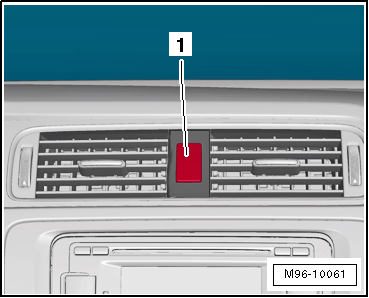
The hazard warning light button E229(1) is located in the centre console between the air vents.
Warning
- When removing and installing components that are visible (switches/covers/trims), mask off areas in which tools (removal wedge VAS 3409/ screwdriver) are used to lever out those components using commercially available masking tape.
Switch off ignition and all electrical consumers, and remove ignition key.
Remove centre vent Heating, air conditioning systemRep. gr.80Repairing heating system; Removing vents (Jetta 2011►).
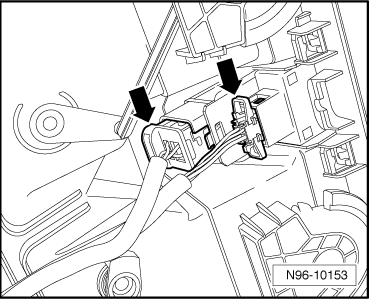
Release connectors (arrows) and disconnect.
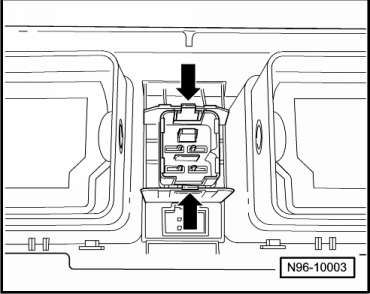
Release locking lugs (arrows) and remove hazard warning lights button E229.
Installation is carried out in reverse order of removal.
‹ Prev Removing and installing warning lamp for airbag deactivated on front passenger side K145Next › Removing and installing glove compartment light switch E26
Parts & tools for this job For 2011 Volkswagen Jetta
- TOOLDigital multimeterSearch: automotive digital multimeter
- PARTAssorted fuse kitSearch: car fuse assortment kit
- TOOLWire crimper and connector kitSearch: wire crimper connector kit
As an Amazon Associate we earn from qualifying purchases.