
Connecting the fault reader
- Make
- Volkswagen
- Model
- LT Mk2
- Year
- 1996–2006
- Section
- Self-diagnosis › Connecting the fault reader
Connecting the fault reader
All functions previously carried out with the fault reader V.A.G 1551 can also be carried out with the vehicle diagnostic, testing and information system VAS 5051B in vehicle self-diagnosis mode.Operating instructions for vehicle diagnostic, testing and information system VAS 5051B.
Special tools and workshop equipment requiredVehicle diagnostic, testing and information system VAS 5051BLT diagnostic cable VAS 5051/4The battery voltage must be at least 11.5 V.Fuses are OK.Earth connections on engine and gearbox OK.Open diagnostic connection cover (1).
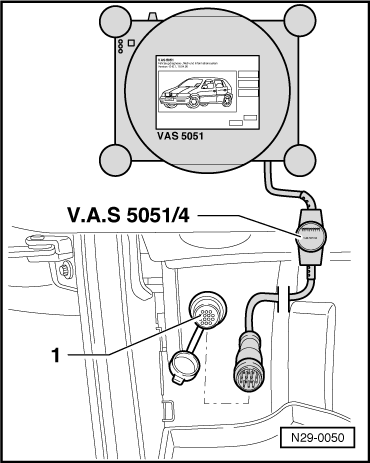
Connect diagnostic cable connector on to diagnostic connection.
Depending upon desired function: Switch ignition on or start engine → Chapter, “Selectable functions”.
LED "0" lights up on LT diagnostic cable VAS 5051/4.
Press key on display for “Vehicle self-diagnosis”.
Press “01 - LT diesel regulation” on display.
The control unit identification and coding are indicated on the display.
If the coding differs from the vehicle version, then:
Check control unit coding → Chapter, coding engine control unit
All the available diagnosis functions are shown on the display.
Press button on display for the desired function..
Note
- The display fields will be displayed from top to bottom in functions 04 - Basic settings or 08 - Read measured value block.
- The following test sequences are described for the fault reader V.A.G 1551.
Note
- Use of V.A.G 1552 Fahrzeugsystemtester instead of the fault reader V.A.G 1551 is not possible.
Open diagnostic connection cover (1).
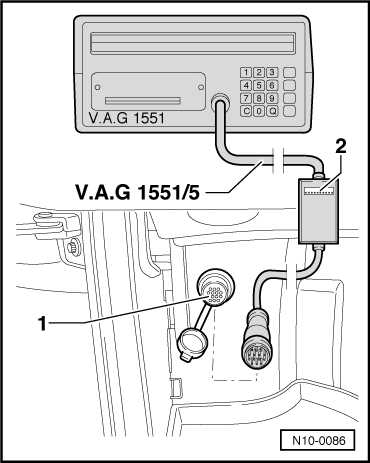
Connect fault reader V.A.G 1551 with LT diagnostic cable V.A.G 1551/5B(2).
After the fault reader V.A.G 1551 has been connected:
Depending upon desired function: Switch ignition on or start engine → Chapter, Table “Selectable functions”.
LED "0" lights up on LT diagnostic cable V.A.G 1551/5B.
Note
- If the display remains blank, check voltage supply for diagnostic connection according to fault finding programme:Current flow diagrams, Electrical fault finding and Fitting locations
- If the display does not indicate as described in the work sequence:Fault reader V.A.G 1551 operating instructions
- If due to an input fault “Fault in the data transfer!” is displayed, pull cable off fault reader V.A.G 1551, reconnect and repeat work step.
The following appears alternatingly on the display:
V.A.G SELF-DIAGNOSIS HELP 1 - Rapid data transferOperate fault reader V.A.G 1551 taking into account the information on the display:
Press button 2 for “LT diagnosis”.
Information on the display after pressing button 2:
V.A.G SELF-DIAGNOSIS HELP 2 - LT diagnosisPress buttons 0 and 1 for address word “diesel regulation” and confirm the input with Q button.
LT diagnosis HELPEnter address word XXThe fault reader V.A.G 1551 display will show the control unit identification, e.g.:
2D0906019A 2.8l R4 EDC G001SG 3704 -> Coding 00002 WSC 00000- 2D0906019A = Part No. of control unit (for up-to-date control unit version see parts catalogue)
- 2.8 l = Engine displacement
- R4 = Type of engine (4-cyl. in-line engine)
- EDC = Injection system (Electronic Diesel Control)
- A = Working speed governor G = Equipped with CCS (Cruise Control System)
- 00 = Reserved, no meaning at present
- 1 = Top speed limit set (0 = No top speed limit)
- SG = Gearbox type: manual gearbox (AG = automatic gearbox)
- 3704 = Control unit software version
- Coding xxxxx = Control unit coding, coding variants of engine control unit → Chapter.
- WSC xxxxx = Workshop code from fault reader V.A.G 1551 with which coding was last carried out. (If the factory coding has not been changed, WSC 00000 appears)
Press the → button.
Indicated on display:
Rapid data transfer HELPSelect function XXFurther measures see repair procedures.
Parts & tools for this job For 1996 Volkswagen LT
- TOOLOBD2 scannerSearch: OBD2 scanner
- TOOLDigital multimeterSearch: automotive digital multimeter
- TOOLBack-probe test leadsSearch: back probe test leads
As an Amazon Associate we earn from qualifying purchases.