
Installing
- Make
- Volkswagen
- Model
- LT Mk2
- Year
- 1996–2006
- Section
- Repairing front brakes › Installing
Installing
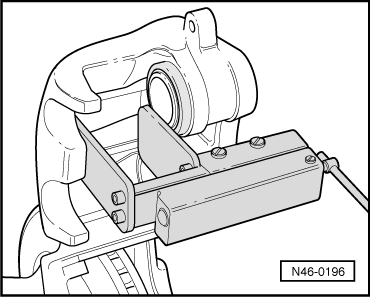
Before inserting new brake pads, press piston back into the cylinder with resetting tool. Before pressing the piston back, draw off brake fluid from the reservoir with a bleed bottle. Otherwise particularly if reservoir has been topped up, fluid will overflow and cause damage.
Press back the piston with the piston resetting appliance.
Using a screwdriver, carefully press brake wear indicator (2) into the new brake pad up to the stop.
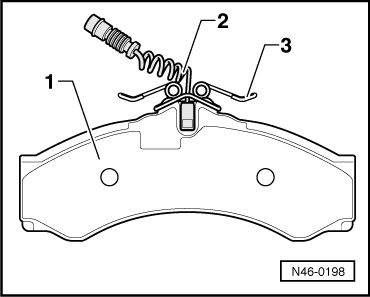
Place retaining spring (3) onto the brake pad.
Insert brake pads.
Swivel the brake caliper housing down and tighten the securing bolts to the prescribed tightening torque.
- Take care with the brake pad wear indicator when swivelling down the brake caliper.
- The repair kit includes two self-locking hexagon bolts which must always be installed.
Fit the wheels. Tightening torque for wheel bolts Wheels, tyres, vehicle geometryRep. Gr.44
- After replacing brake pads, depress brake pedal firmly several times with vehicle stationary, so that the brake pads are properly seated in their normal operating position.
- After changing brake pads check brake fluid level.
Parts & tools for this job For 1996 Volkswagen LT
- PARTBrake padsSearch: Volkswagen LT 1996 brake pads
- TOOLBrake bleeder kitSearch: one man brake bleeder kit
- FLUIDBrake fluidSearch: brake fluid
As an Amazon Associate we earn from qualifying purchases.