
Calling-up service software
- Make
- Volkswagen
- Model
- Passat B5
- Year
- 1996–2005
- Section
- Navigation system › Calling-up service software
Calling-up service software
The software for service department is called up using the following steps:
With ignition switched “On”, take navigation CD out of navigation system control unit with CD drive.
Switch the ignition off and wait for approx. 5 seconds.
Simultaneously press the OFF and INFO buttons on the operating unit and switch the ignition to “ON”.
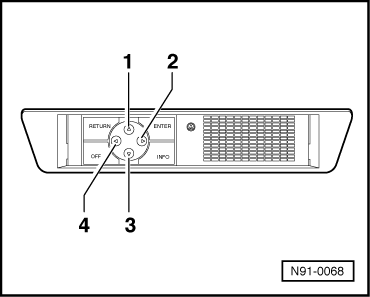
Appears briefly on the display:
| CALIBRATION PROGRAMME FOR AUDI > VW |
Select the “VW” menu item using up cursor button (1) and down cursor button (3) on the operating unit, i.e. the “>” arrow symbol is located in front of the menu item and the ENTER button is pressed to call up the menu item.
Indicated on display:
| VW NAVI CALIBRATION PROGRAMME FACTORY > SERVICE |
Select the “Service” menu item using up cursor button (1) and down cursor button (3), i.e. the “>” arrow symbol is located in front of the menu item.
Confirm the selection by pressing the ENTER button.
Indicated on display:
| REAR WINDOW HEATER OFF! > OK |
The functions of the service department software must be performed when the rear window heater is switched off.
Check to see that the rear window heater is deactivated and switch off if necessary.
Confirm “OK” by pressing the ENTER button.
Indicated on display:
| SERVICE MENU: > SYS. TEST DRIVE TST. WHEEL CALIB. END |
Note
- Exit the service department software via the “END” menu item, if possible.
- It is also possible to terminate the service department software at any time by switching the ignition to “Off” but calibrations already carried out will not be saved.
Parts & tools for this job For 1996 Volkswagen Passat
- TOOLDigital multimeterSearch: automotive digital multimeter
- PARTAssorted fuse kitSearch: car fuse assortment kit
- TOOLWire crimper and connector kitSearch: wire crimper connector kit
As an Amazon Associate we earn from qualifying purchases.