
Removing and installing rotary light switch EX1
- Make
- Volkswagen
- Model
- Passat B8
- Year
- 2014–2023
- Section
- Controls › Removing and installing rotary light switch EX1
‹ Prev Overview of fitting locations - controls in roof trimNext › Removing and installing headlight range control regulator E102
Electrical systemRemoving and installing rotary light switch EX1
Removing and installing rotary light switch EX1
Special tools and workshop equipment requiredRemoval wedge 3409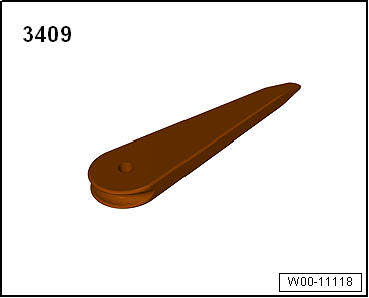
Warning Danger of damage to component surfaces.
- When using leverage tools, mask visible areas of the component with commercially available adhesive tape.
Note
- The removal and installation procedures are described for LHD vehicles. Removal and installation for RHD vehicles are similar.
Turn light switch to “0” position.
Unclip rotary light switch EX1(2) towards rear from dash panel (1)(arrow).
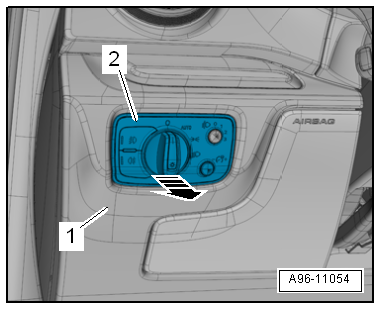
If the rotary light switch cannot be removed as described, proceed as follows:
Remove storage compartment on driver side General body repairs, interiorRep. gr.68Compartments/covers.
Push out rotary light switch EX1(1) through opening in dash panel (1) towards rear (arrow).
Disconnect connector, and remove rotary light switch EX1(2).
Installation is carried out in the reverse sequence.
‹ Prev Overview of fitting locations - controls in roof trimNext › Removing and installing headlight range control regulator E102
Parts & tools for this job For 2014 Volkswagen Passat
- TOOLOBD2 scannerSearch: OBD2 scanner
- TOOLDigital multimeterSearch: automotive digital multimeter
- TOOLBack-probe test leadsSearch: back probe test leads
As an Amazon Associate we earn from qualifying purchases.