
Removing and installing engine mounting
- Make
- Volkswagen
- Model
- Phaeton 3D
- Year
- 2002–2016
- Section
- Assembly mountings › Removing and installing engine mounting
Removing and installing engine mounting
Bracing the engine in its installation position → Chapter.
Remove the bearing bracket for the anti-roll bar on the left and right from the engine carrier Running gear, axles - front and four-wheel driveRep. gr.40Assembly overview-B-: Subframe, suspension links and anti-roll bar.
Pull vacuum line (1) off left engine support.
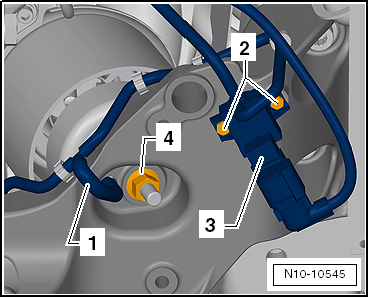
Undo and remove bolts (2) and remove change-over valve (3) (lines remain connected).
Undo nut (4) from left engine support.
Pull vacuum line (1) off right engine support.
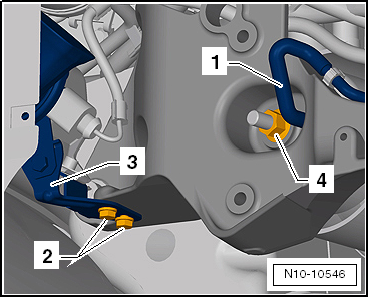
Undo and remove bolts (2) and remove treble horn H2 together with bracket (3).
Loosen nut (4) on right engine support, do not remove completely.
Unclip complete vacuum line from engine carrier.
Remove upper part and lower part of right air filter.
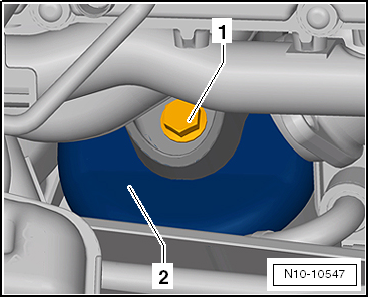
Undo and remove bolt (1) from right engine support (2).
Undo and remove bolts (1) from left and right engine supports.
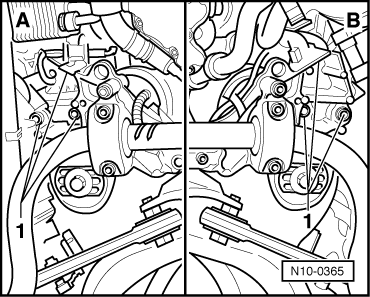
Remove engine carrier together with right engine support and heat shield.
Undo nut for fastening right engine support to engine carrier and then remove right engine support.
Installation is carried out in the reverse order; note the following → Chapter.
Parts & tools for this job For 2002 Volkswagen Phaeton
- PARTEngine gasket setSearch: Volkswagen Phaeton 2002 engine gasket set
- TOOLTorque wrenchSearch: 3/8 inch torque wrench
- TOOLFeeler gauge setSearch: feeler gauge set
As an Amazon Associate we earn from qualifying purchases.