
Removing and installing steering column switch
- Make
- Volkswagen
- Model
- Phaeton 3D
- Year
- 2002–2016
- Section
- Steering column switch › Removing and installing steering column switch
Removing and installing steering column switch
Note
- To disconnect and reconnect the battery, the procedure described in the workshop manual should be strictly adhered to → Chapter.
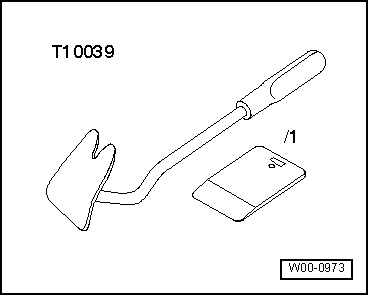
Using electric or mechanical adjustment mechanism, extend steering wheel completely and move to lowest position.
Disconnect battery → Chapter.
Remove driver side airbag General body repairs, interiorRep. gr.69Airbag.
Remove steering wheel General body repairs, interiorRep. gr.69Airbag.
Remove bolts (arrows).
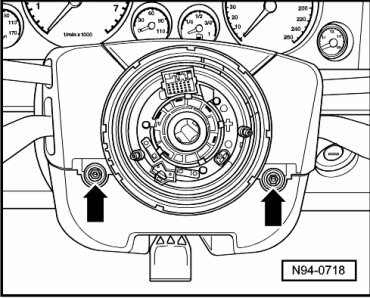
Lever right trim (arrow) on steering column switch out of fastenings using wedge T10039/1 and push outwards.
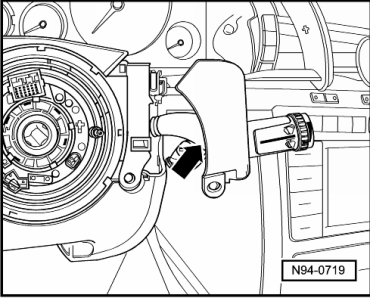
Lever left trim, in mirror position on steering wheel switch, out of fastenings using wedge T10039/1 and push outwards.
Note
- The trim parts are not to be removed.
Move upper trim -up arrow- upwards from steering column switch and remove.
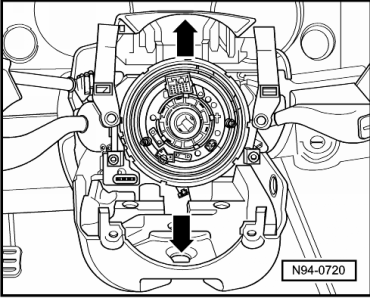
Move lower trim -down arrow- downwards from steering column switch and remove.
Remove hexagon socket head bolt (arrow).
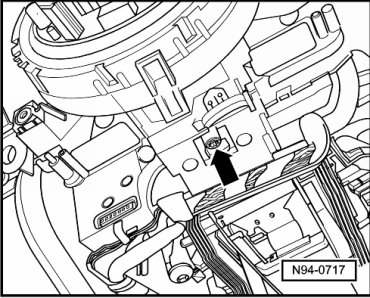
Remove steering column switch.
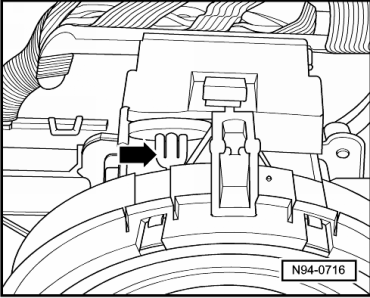
Press retaining clip out of wiring guide (arrow).
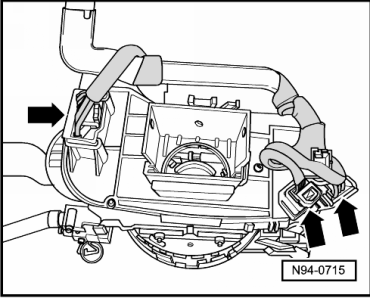
Disconnect connectors (arrows) from steering column switch.
Installation is carried out in the reverse order. When installing observe the following:
Tighten hexagon socket head bolt (arrow) to specified torque of 1.5 Nm.
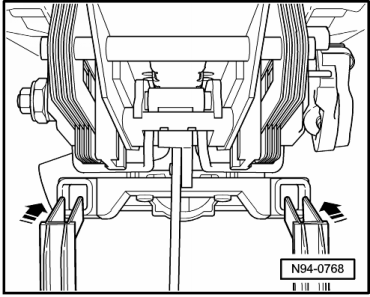
Guide in lower steering column switch trim (arrows) as shown.
Install steering wheel General body repairs, interiorRep. gr.69Airbag.
Install driver side airbag General body repairs, interiorRep. gr.69Airbag.
Parts & tools for this job For 2002 Volkswagen Phaeton
- TOOLOBD2 scannerSearch: OBD2 scanner
- TOOLDigital multimeterSearch: automotive digital multimeter
- TOOLBack-probe test leadsSearch: back probe test leads
As an Amazon Associate we earn from qualifying purchases.