
Removing multifunction switch F125
- Make
- Volkswagen
- Model
- Polo Mk5, India and Malaysia
- Year
- 2010–2020
- Section
- Multifunction switch F125 › Removing multifunction switch F125
Removing multifunction switch F125
Move selector lever to position “N”.
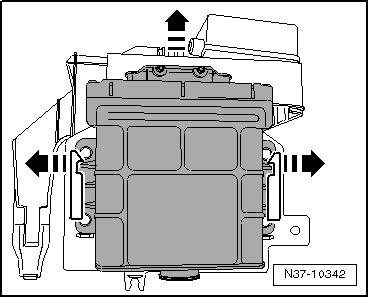
Remove automatic gearbox control unit J217 from bracket and place »safely« to one side.
Remove battery with battery tray Rep. gr.27Battery; Removing and installing battery.
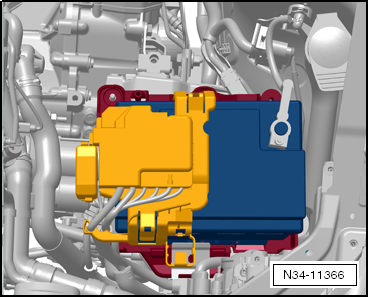
Note
- Do not open cooling system.
Lever cable (1) off lever using an open jaw spanner (2).
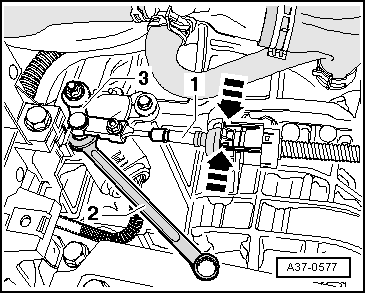
Warning Carefully push together catches of selector lever cable (arrows) because lugs can break off very easily. If one of the lugs breaks off, renew complete gear selector mechanism with selector lever cable.
Remove selector lever cable upwards out of cable support bracket, being careful not to kink cable.
Pull connector off multifunction switch F125.
Unscrew nut (1).
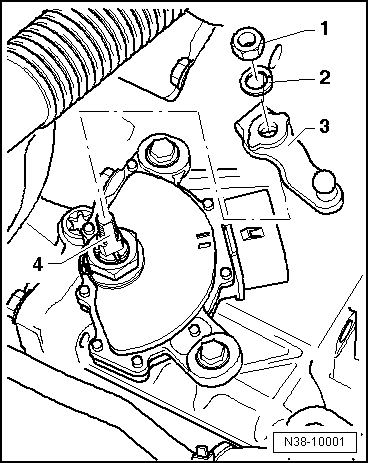
Remove spring ring (2) and lever (3) from selector shaft (4).
Carefully bend back hooks of lock washer (2) using a screwdriver.
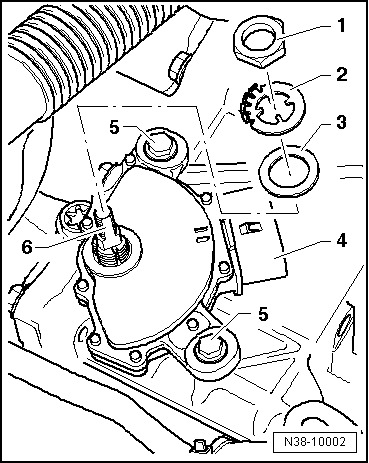
Renew securing clip if hooks have broken off.
Unscrew nut (1).
Remove bolts (5).
Pull multifunction switch (4), together with washers (2) and (3), off selector shaft (6).
Parts & tools for this job For 2010 Volkswagen Polo
- TOOLOBD2 scannerSearch: OBD2 scanner
- TOOLDigital multimeterSearch: automotive digital multimeter
- TOOLBack-probe test leadsSearch: back probe test leads
As an Amazon Associate we earn from qualifying purchases.