
Removing and installing bumper cover
- Make
- Volkswagen
- Model
- Polo Mk5, India and Malaysia
- Year
- 2010–2020
- Section
- Rear bumper › Removing and installing bumper cover
Removing and installing bumper cover
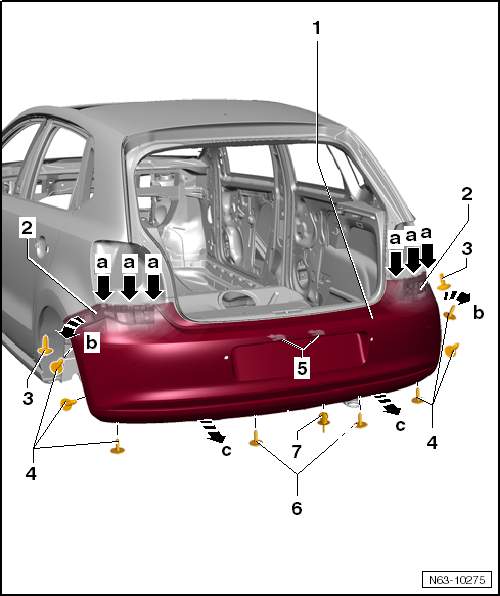
Remove tail lights Electrical systemRep. gr.94Lights, bulbs, switches - exterior; Removing and installing tail lights
Remove bolts (4) on left and right sides in area of wheel housing liner.
Remove bolts (3) (pointing upwards) on left and right.
Remove bolts (6) and remove clip (7).
Pull rear bumper cover (1) out of fasteners in lateral guides (arrows b).
Further dismantling requires the help of a second mechanic.
Release fasteners (arrows a) at lateral guides (2).
With the aid of a second mechanic, pull bumper cover (1) off vehicle in parallel (arrows c).
Disconnect connectors of electrical components.
Number plate lights Electrical systemRep. gr.94Lights, bulbs, switches - exterior.
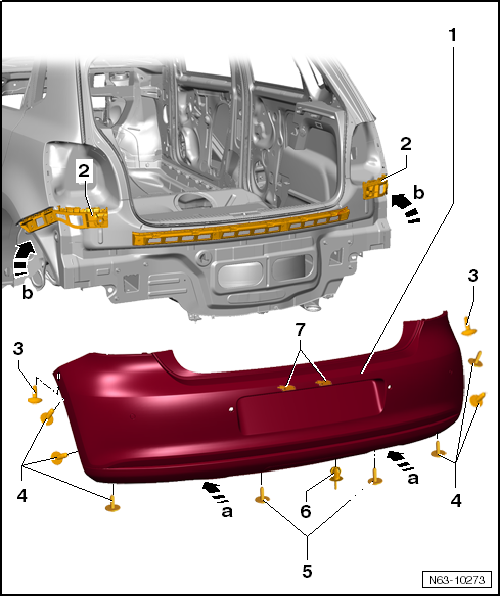
Connect connectors of electrical components.
Fit rear bumper cover (1) with the aid of a second mechanic (arrows a).
Note
- When fitting the rear bumper cover, make sure that it runs parallel along the left and right guide profiles.
Push rear bumper cover (1) onto centre guide profile and onto left and right guide profiles (2)(arrows b), until they engage audibly with one another.
Check that parts are parallel and gaps are even Body RepairsRep. gr.00; Karosseriespaltmaße; Karosserie hinten.
Start bolts (3), (4) and (5) and tighten.
Fasten clip (6).
Install tail lights Electrical systemRep. gr.94Tail lights; Removing and installing tail lights.
- Bumper cover Chapter“Rear bumper cover”
Parts & tools for this job For 2010 Volkswagen Polo
- TOOLTrim removal tool kitSearch: trim removal tool kit
- PARTTouch-up paintSearch: Volkswagen touch up paint
- PARTPanel clip assortmentSearch: Volkswagen panel clips assortment
As an Amazon Associate we earn from qualifying purchases.