
Removing and installing additional brake light
- Make
- Volkswagen
- Model
- Polo Mk4
- Section
- Additional brake light › Removing and installing additional brake light
‹ Prev Additional brake light (except Polo GTI, Polo Blue Motion)Next › Additional brake light (Polo GTI, Polo Blue Motion)
Electrical systemRemoving and installing additional brake light
Removing and installing additional brake light
Switch off ignition and all electrical consumers and remove ignition key.
Note
- The lower rear lid trim and then the upper rear lid trim must be removed before the additional brake light can be taken out.
Remove lower rear lid trim General body repairs, interiorRep. Gr.70Rear lid trim; Removing and installing lower rear lid trim; Removing.
Remove upper rear lid trim General body repairs, interiorRep. Gr.70Rear lid trim; Removing and installing upper rear lid trim; Removing.
Remove securing screws (arrows).
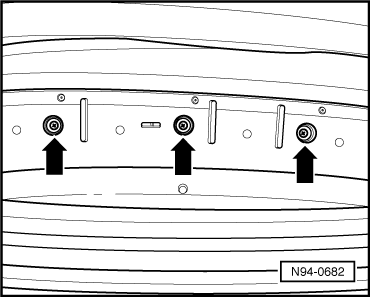
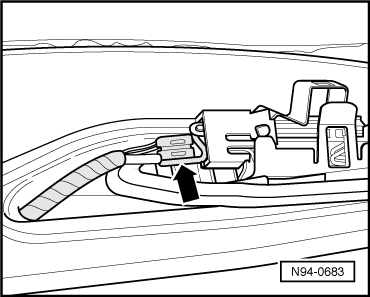
Take additional brake light out upwards, note length of cable.
Pull off connector (arrow).
Install in the reverse order of removal. When doing this, note the following:
Tighten securing bolts to specified torques → Chapter.
‹ Prev Additional brake light (except Polo GTI, Polo Blue Motion)Next › Additional brake light (Polo GTI, Polo Blue Motion)
Parts & tools for this job For Volkswagen Polo
- PARTBrake padsSearch: Volkswagen Polo brake pads
- TOOLBrake bleeder kitSearch: one man brake bleeder kit
- FLUIDBrake fluidSearch: brake fluid
As an Amazon Associate we earn from qualifying purchases.