
Removing and installing dash panel insert
- Make
- Volkswagen
- Model
- Polo Mk4
- Section
- Dash panel insert › Removing and installing dash panel insert
Electrical systemRemoving and installing dash panel insert
Removing and installing dash panel insert
Note
- Before removing the dash panel insert, the Chapter“Renewing dash panel insert” work procedure should always be carried out in order that the data stored in the control unit can be read.
- There is no need to remove the steering wheel. For reasons of clarity, however, the steering wheel is not shown in the following figures.
Pull out steering wheel fully using adjuster and engage steering wheel at lowest position.
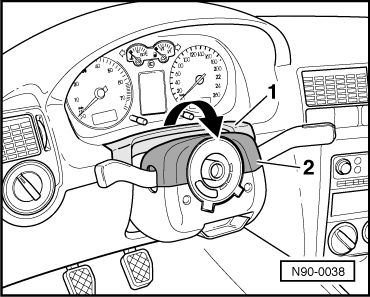
Release cover (1) from fasteners and place it down on upper cover of steering column switch (2).
Remove securing bolts (arrows).
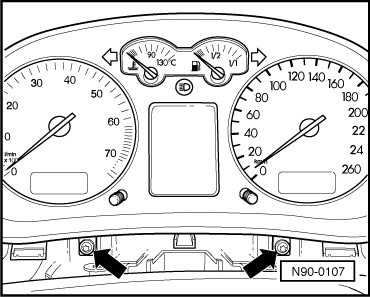
Pull dash panel insert out of dash panel as far as the cable lengths allow.
Unplug connectors on back of dash panel insert and remove dash panel insert from vehicle.
Install in reverse order of removal.
Parts & tools for this job For Volkswagen Polo
- TOOLDigital multimeterSearch: automotive digital multimeter
- PARTAssorted fuse kitSearch: car fuse assortment kit
- TOOLWire crimper and connector kitSearch: wire crimper connector kit
As an Amazon Associate we earn from qualifying purchases.