
Removing and installing mounting bracket
- Make
- Volkswagen
- Model
- Polo Mk4
- Section
- Steering column › Removing and installing mounting bracket
Running gear, axles, steeringRemoving and installing mounting bracket
Removing and installing mounting bracket
Remove cover on driver side General body repairs, interiorRep. gr.68Compartments, covers and trim; Removing cover on driver side.
Remove steering column → Chapter.
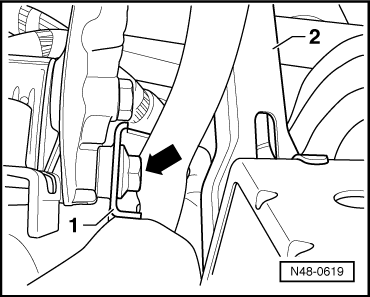
Remove bolt (arrow) for strut (1) to left of pedal assembly (2).
Remove bolts (arrows) and take out mounting bracket.
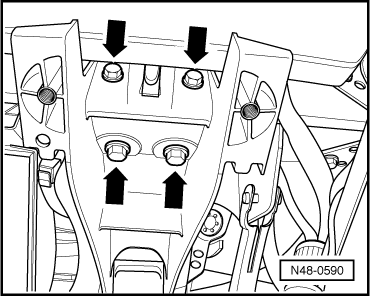
Fit mounting bracket, position all 4 bolts (arrows) and then tighten.
Install steering column → Chapter.
Continue installation in reverse order.
| Component | Specified torque |
|---|---|
| Mounting bracket to cross member | 23 Nm |
Parts & tools for this job For Volkswagen Polo
- TOOLTie rod end toolSearch: tie rod end puller
- TOOLBall joint separatorSearch: ball joint separator
- FLUIDPower steering fluidSearch: Volkswagen power steering fluid
As an Amazon Associate we earn from qualifying purchases.