
Removing and installing master cylinder
- Make
- Volkswagen
- Model
- Scirocco Mk3
- Year
- 2008–2017
- Section
- Clutch operation › Removing and installing master cylinder
Removing and installing master cylinder
Special tools and workshop equipment requiredPliers T10005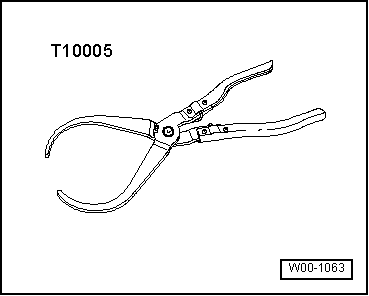
Remove mounting bracket, Golf 2004 ► Chapter.
Remove mounting bracket, Golf 2009 ► left-hand drive and Scirocco → Chapter.
Remove mounting bracket, Golf 2009 ► right-hand drive and Golf Plus right-hand drive → Chapter.
Remove mounting bracket, Golf Plus left-hand drive → Chapter.
Remove mounting bracket, Passat, Passat CC and CC Chapter.
Remove mounting bracket, Eos → Chapter.
Release retainer for master cylinder operating rod using pliers T10005.
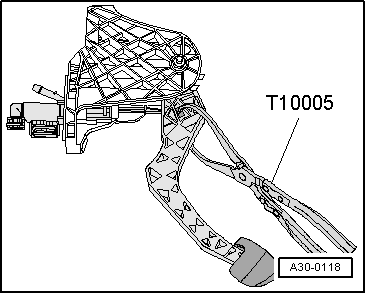
Insert spacer (A) between clutch pedal and stop and press clutch pedal to spacer.
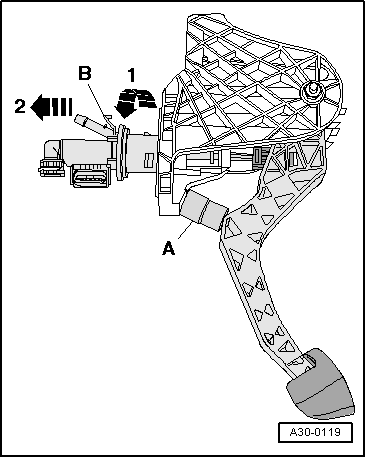
- Length of spacer = about 40 mm (e.g. 1/2 socket).
Release securing bar (B) and pull master cylinder out of mounting bracket (arrow 1) and (arrow 2).
Move clutch pedal to rest position at stop.Attach retainer (2) to master cylinder operating rod (1).
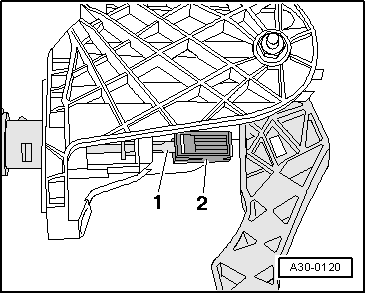
Insert spacer (A) between clutch pedal and stop and press clutch pedal to spacer.
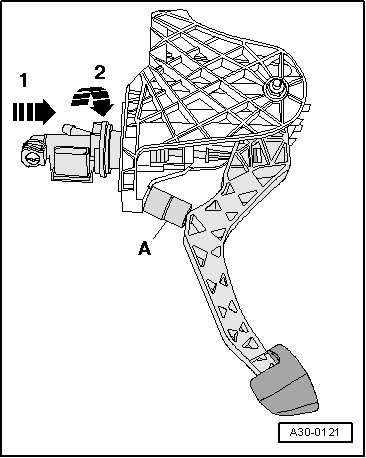
- Length of spacer = about 40 mm (e.g. 1/2" socket)
Engage master cylinder in mounting bracket (arrow 1) and (arrow 2).
Press master cylinder operating rod (1) in direction of arrow until retainer (2) engages audibly in clutch pedal.
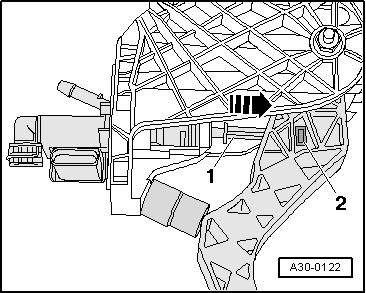
Install mounting bracket, Golf 2004 ► Chapter.
Install mounting bracket, Golf 2009 ► left-hand drive and Scirocco → Chapter.
Install mounting bracket, Golf 2009 ► right-hand drive and Golf Plus right-hand drive → Chapter.
Install mounting bracket, Golf Plus left-hand drive → Chapter.
Install mounting bracket, Passat, Passat CC and CC Chapter.
Install mounting bracket, Eos → Chapter.
Parts & tools for this job For 2008 Volkswagen Scirocco
- TOOLBrake bleeder kitSearch: one man brake bleeder kit
- FLUIDBrake fluidSearch: brake fluid
- TOOLBrake line flaring toolSearch: brake line flaring tool
As an Amazon Associate we earn from qualifying purchases.