
Removing and installing mounting bracket, right-hand drive
- Make
- Volkswagen
- Model
- Scirocco Mk3
- Year
- 2008–2017
- Section
- Brake pedal › Removing and installing mounting bracket, right-hand drive
Removing and installing mounting bracket, right-hand drive
Separate brake pedal from brake servo → Chapter.
Remove brake pedal → Chapter.
Remove engine cover panel Rep. gr.10Engine cover panel; Removing and installing engine cover panel
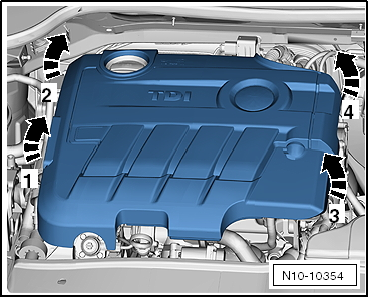
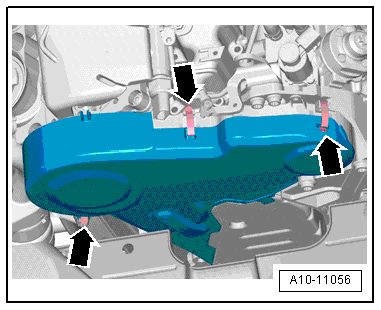
Remove upper timing belt guard by detaching clips (arrows).
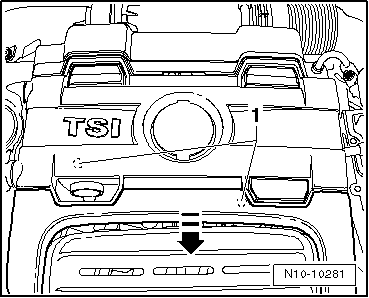
Lift engine cover panel at points (1) and pull it towards front ((direction of arrow)).
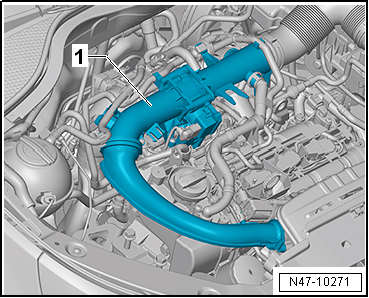
Remove pressure pipe (1) together with regulating flap control unit J808 and throttle valve module J338Rep. gr.24Intake manifold; Assembly overview – intake manifold.
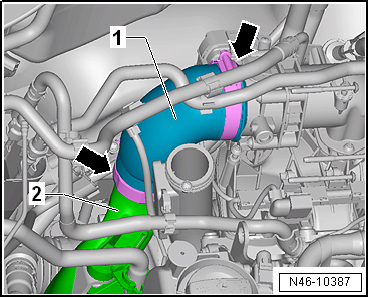
Remove charge air hose (1) between throttle valve module J338 and charge air pipe (2)(arrows). When doing this, release charge air pipe (2) from engine Rep. gr.21Charge air system; Assembly overview – charge air system.
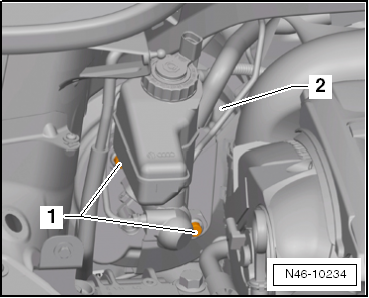
Remove bolt (1) from brake booster (2).
Unclip wiring harness (4) from brake pedal mounting bracket.
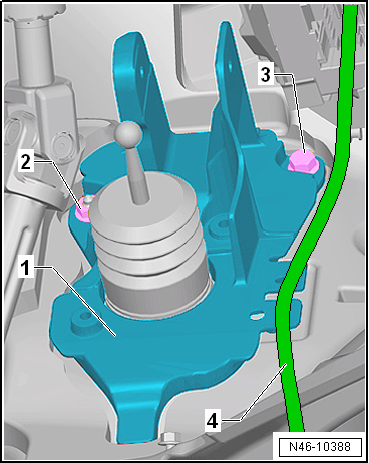
Unscrew bolt (3) on the right above the brake pedal support.
Unscrew nut (2) on left beneath brake pedal support.
If fitted, unclip upper control unit holder from mounting bracket.
Remove mounting bracket (1).
Install in reverse order of removal, observing the following:
First, screw bolt (3) in loosely.
Then, tighten brake booster (2) with bolts (1).
Installing brake pedal → Chapter
Connecting brake pedal to brake servo → Chapter.
- Chapter“Assembly overview - brake pedal”
Parts & tools for this job For 2008 Volkswagen Scirocco
- PARTBrake padsSearch: Volkswagen Scirocco 2008 brake pads
- TOOLBrake bleeder kitSearch: one man brake bleeder kit
- FLUIDBrake fluidSearch: brake fluid
As an Amazon Associate we earn from qualifying purchases.