
Removing and installing radio
- Make
- Volkswagen
- Model
- Scirocco Mk3
- Year
- 2008–2017
- Section
- Radio › Removing and installing radio
Removing and installing radio
Special tools and workshop equipment requiredRemoval wedge 3409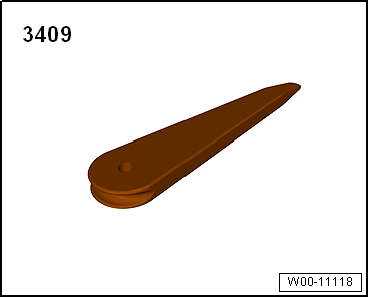
Remove any CDs left in the device Operating manual.
Switch off ignition and all electrical consumers.
Remove ignition key.
Remove trim with vents Trims/insulationRep. gr.70Dash panel; Removing and installing dash panel vents
Undo screws (arrows) holding radio/radio navigation system in place.
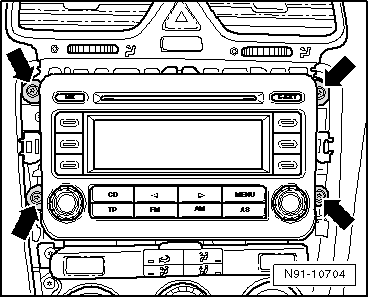
Pull radio navigation system out of installation slot until you can access connectors on rear of radio/radio navigation system.
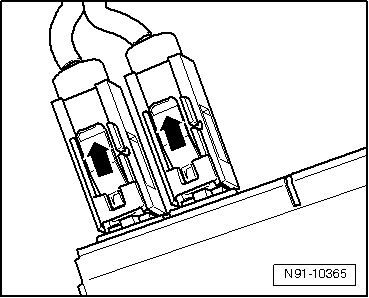
Press together connector locking mechanism in direction of (arrows).
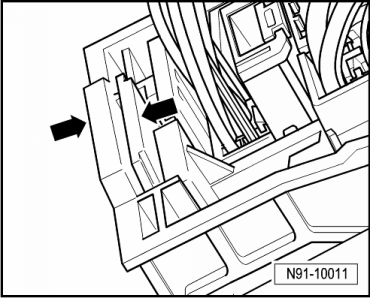
Pull locking bar in direction of (arrow).
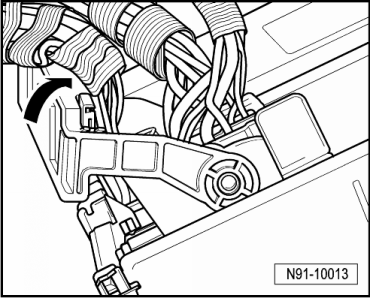
Pull out connector.
Disconnect connectors (arrows) from aerial connections.
Install in the reverse order of removal, observing the following:
Note
- When inserting radio or radio navigation system, never press against the display or operating keys, as otherwise the unit could become damaged.
Check radio/radio navigation system code, and recode it as necessary Vehicle diagnostic tester.
Parts & tools for this job For 2008 Volkswagen Scirocco
- TOOLDigital multimeterSearch: automotive digital multimeter
- PARTAssorted fuse kitSearch: car fuse assortment kit
- TOOLWire crimper and connector kitSearch: wire crimper connector kit
As an Amazon Associate we earn from qualifying purchases.