
Removing and installing slider
- Make
- Volkswagen
- Model
- Scirocco Mk3
- Year
- 2008–2017
- Section
- Front seats › Removing and installing slider
‹ Prev Removing and installing driver seat lumbar support adjustment switch E176Next › Removing and installing torsion rod
General body repairs, interiorRemoving and installing slider
Removing and installing slider
Push front seat as far as stop to rearmost position.
Unlock front seat with handle for Easy Entry.
Swing backrest forwards.
At the same time, move front seat to foremost position.
Unscrew rear tunnel-side bolt from front seat.
Push button (arrow A) of memory block in direction of (arrow) to release memory block.
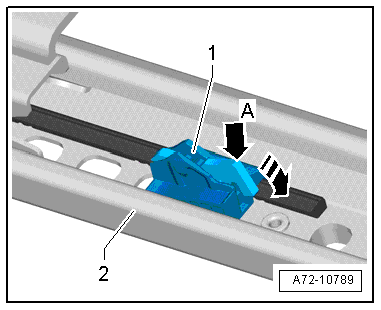
Pull memory block (1) backwards out of seat rail (2) by tilting slightly in direction of tunnel.
Install in reverse order, but note the following:
Insert memory block in seat rail (1) by tilting slightly in direction of tunnel.
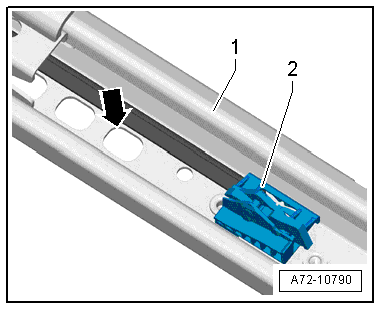
Engage memory block in rearmost detent hole (arrow).
Tighten rear tunnel-side bolt on front seat.
Note
- Special adjustment of the slider is not necessary.
| Component | Specified torque |
|---|---|
| Bolt | 40 Nm |
‹ Prev Removing and installing driver seat lumbar support adjustment switch E176Next › Removing and installing torsion rod
Parts & tools for this job For 2008 Volkswagen Scirocco
- TOOLTrim removal tool kitSearch: trim removal tool kit
- PARTTouch-up paintSearch: Volkswagen touch up paint
- PARTPanel clip assortmentSearch: Volkswagen panel clips assortment
As an Amazon Associate we earn from qualifying purchases.