
Clock and date: Setting
- Make
- Volkswagen
- Model
- Scirocco Mk3
- Year
- 2008–2017
- Section
- Capacities › Clock and date: Setting
Clock and date: Setting
Chapter“Time and date: setting, up to model year ►2014”Time and date: setting, up to model year ►2014
Chapter“Time and date: setting, as of model year 2015►”Time and date: setting, as of model year 2015►
Time and date: setting, up to model year ►2014
The setting buttons are located on the left below the rev. counter.
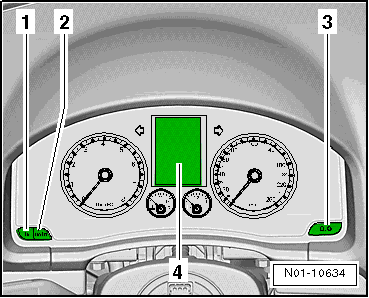
Press the left button h(1) to set the hours. Press the button only briefly to advance the time one hour.
Press the right button min(2) to set the minutes. Press the button briefly to advance the time one minute.
Switch on ignition. A vehicle symbol is displayed.
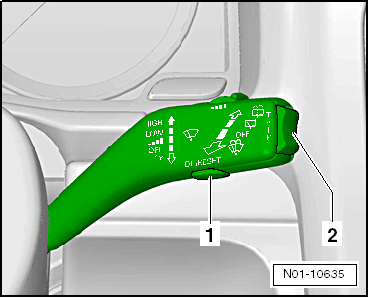
Press button (2) for 2 seconds to open the main menu.
With button (2), select then menu “Settings”. Confirm selection with button (1).
Press button (2) to select the menu “Time” and confirm using button (1).
Now mark menu item “Hours” by pressing button (1), set correct hour using button (2) and confirm with button (1).
For the menu option “Minutes” it is the same procedure.
The menu “Settings” can be closed via the menu option “Back”.
Now select “MFI” for actual display and confirm this using button (1).
Switch off ignition.
Switch on ignition.
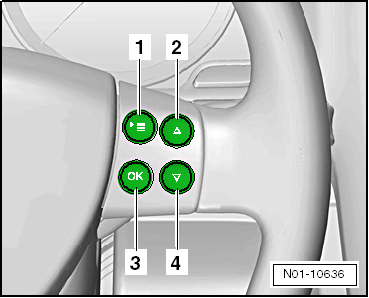
Press button (1) until menu “Settings” appears.
Select menu option “Time” with buttons (2) and (4).
Confirm the selection with button (3).
Press button (3) to confirm “Hours” and set the correct hour using buttons (2) and (4).
Press button (3) again and set the minutes, which is the same procedure as for setting the hours.
The menu can be closed with button (1).
Switch off ignition.
Time and date: setting, as of model year 2015►
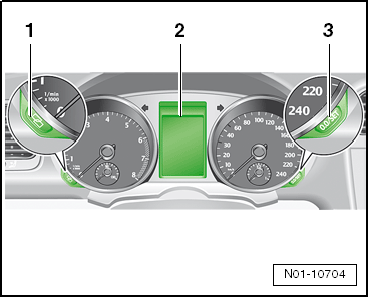
The time is set using buttons (1) and (3) in the dash panel insert.
Briefly press button (1).
The time is shown on the display (2), and the hour value is highlighted.
Press button (3) until the desired hour value is displayed.
Again, briefly press button (1).
Now, the minute value (2) is highlighted on the display.
Press button (1) until the desired minute value is displayed.
Switch on ignition.
Select menu “Settings” using buttons in multifunction steering wheel.
Select menu item “Time”.
Confirm selection by pressing »OK«.
Select menu item “Set time”.
Set time using »arrow buttons« on multifunction steering wheel, and confirm setting by pressing »OK«.
Switch on ignition.
Switch on Infotainment system.
Press infotainment Setup button.
Press System function button.
Press Date function button and set current date.
Parts & tools for this job For 2008 Volkswagen Scirocco
- TOOLA/C manifold gauge setSearch: AC manifold gauge set
- TOOLUV leak detection kitSearch: AC UV leak detection kit
- PARTCabin filterSearch: Volkswagen Scirocco 2008 cabin filter
As an Amazon Associate we earn from qualifying purchases.