
Layout - infotainment system, Discover Pro version
- Make
- Volkswagen
- Model
- Tiguan Mk2
- Year
- 2016–2023
- Section
- Infotainment system › Layout - infotainment system, Discover Pro version
‹ Prev Overview - infotainment system, Composition Media and Discover Media versionsNext › Overview of fitting locations - infotainment system
Electrical: CommunicationLayout - infotainment system, Discover Pro version
Layout - infotainment system, Discover Pro version
Control unit 1 for information electronics J794/display unit for front information display and operating unit control unit J685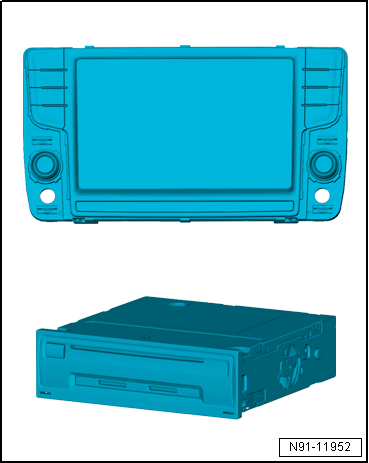
- 8-inch multicolour touch screen (proximity sensing)
- 4 x 20 watt output power
- RDS FM/AM radio
- Integrated Dual DAB tuner for digital radio reception
- Integrated diversity function
- 3 D navigation system with GPS satellite receiver
- CD/DVD drive
- SD memory card reader with 2 SD card slots
- 10 GB SSD drive
- AUX IN above stereo jack in front centre console
- USB connection in front of centre console
- iPod connection
- AAC
- AV output
- MP3 play function
- WMA
- JPEG viewer
- Support for multifunction steering wheel
- Support for vehicle menu
- Self-diagnosis, including loudspeaker diagnosis
- Speed dependent volume control (GALA)
- Speed dependent dynamic compression (GADK)
- Bluetooth hands-free system
- Voice control
- USB connection in rear
- WLAN internal
- UMTS
- FBAS (reversing camera)/FBAS (overhead view camera)
- TV tuner R78
- Car-Net (with Google Navigation, Google Street View, POI Online and Google Search)
- App Connect ("Mirroring" of smartphone display on the infotainment touch-screen; allows display and operation of smartphone apps)
- Media Control (display and operation of navigation information, remote control of radio/media player, remote control of sound settings, control of air conditioning system, control of interior light settings)
Note
- When dealing with complaints it is absolutely necessary to understand the function and operation of the infotainment system.
- Additional information can be found in the Operating manual.
- Other systems in the vehicle are connected via CAN bus (infotainment) and data bus diagnostic interface J533.
- Fault finding is performed using Vehicle diagnostic tester.
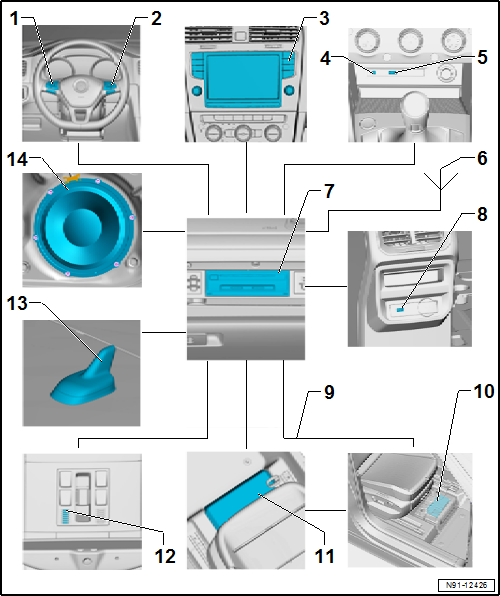
- Multifunction buttons on left in steering wheel E440
Further information → Chapter - Multifunction buttons on right in steering wheel E441
Further information → Chapter - Display unit for control device of front display and information control panel J685
Further information → Chapter - AUX-IN connection in front centre console storage compartment
Further information → Chapter - USB connection in front centre console storage compartment
Further information → Chapter - Window aerial
Further information → Chapter - Information electronics control unit 1 J794
Further information → Chapter - USB connection in rear
Further information → Chapter - MOST bus
- TV tuner R78
Further information → Chapter - Digital sound package control unit J525
Further information → Chapter - Telephone microphone R38
Further information → Chapter - Roof aerial RX5
Further information → Chapter - Sound system
Further information → Chapter
Apart from the CAN bus, the optical data bus “MOST bus” is used.
Optical fibre conductors are used as “connecting cables”. For protection purposes, optical fibre conductors are run through corrugated pipes.
As far as possible, renew the complete optical fibre conductor.
Make sure that the cross-cut ends of connectors are not dirty.
If connectors are separated, attach protective cap for cable-set connector VAS 6223/9.
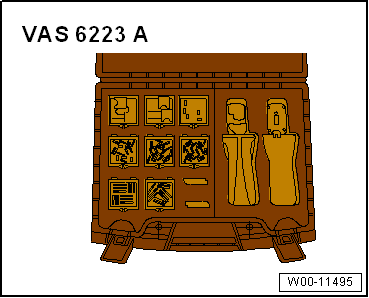
When routing the optical fibre conductor, make sure that the minimum bending radius of 25 mm is observed. Optical fibre conductors must not be kinked or pinched.
Repairs to fibre optic cables → Chapter.
‹ Prev Overview - infotainment system, Composition Media and Discover Media versionsNext › Overview of fitting locations - infotainment system
Parts & tools for this job For 2016 Volkswagen Tiguan
- TOOLDigital multimeterSearch: automotive digital multimeter
- PARTAssorted fuse kitSearch: car fuse assortment kit
- TOOLWire crimper and connector kitSearch: wire crimper connector kit
As an Amazon Associate we earn from qualifying purchases.