
Removing and installing hazard warning light switch EX3
- Make
- Volkswagen
- Model
- Tiguan Mk2
- Year
- 2016–2023
- Section
- Controls › Removing and installing hazard warning light switch EX3
‹ Prev Removing and installing operating unit for driving mode selection E881Next › Removing and installing buttons for seat heating E653/ E654
Electrical systemRemoving and installing hazard warning light switch EX3
Removing and installing hazard warning light switch EX3
Grasp front passenger side airbag deactivated warning lamp K145(1) at sides (arrows A) and pull it out of dash panel.
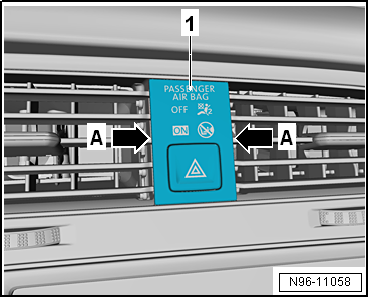
Release and disconnect connectors.
Release fasteners (arrows).
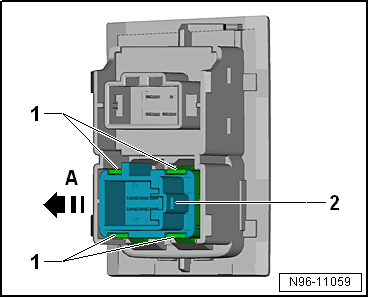
Push hazard warning light switch EX3(2) in (direction of arrow A) out of front passenger side airbag deactivated warning lamp K145.
Install in the reverse order of removal observing the following:
Test functionality.
‹ Prev Removing and installing operating unit for driving mode selection E881Next › Removing and installing buttons for seat heating E653/ E654
Parts & tools for this job For 2016 Volkswagen Tiguan
- TOOLOBD2 scannerSearch: OBD2 scanner
- TOOLDigital multimeterSearch: automotive digital multimeter
- TOOLBack-probe test leadsSearch: back probe test leads
As an Amazon Associate we earn from qualifying purchases.