
Removing and installing central locking SAFELOCK function warning lamp K133
- Make
- Volkswagen
- Model
- Tiguan Mk2
- Year
- 2016–2023
- Section
- Lights › Removing and installing central locking SAFELOCK function warning lamp K133
‹ Prev Removing and installing front footwell illumination bulb L151/ L152Next › Removing and installing reflectors in door
Electrical systemRemoving and installing central locking SAFELOCK function warning lamp K133
Removing and installing central locking SAFELOCK function warning lamp K133
Remove front door trim panel General body repairs, interiorRep. gr.70Front door trim panel; Removing and installing front door trim panel.
Release and separate electrical connector.
Press retaining lugs (arrows) on central locking SAFELOCK function warning lamp K133(2) to release.
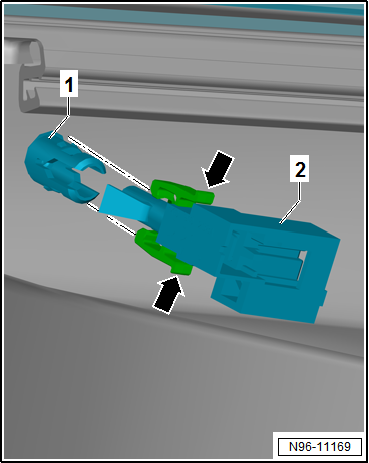
Pull central locking SAFELOCK function warning lamp K133(2) out of mounting (1).
Install in the reverse order of removal observing the following:
Test functionality.
‹ Prev Removing and installing front footwell illumination bulb L151/ L152Next › Removing and installing reflectors in door
Parts & tools for this job For 2016 Volkswagen Tiguan
- PARTReplacement bulbsSearch: Volkswagen Tiguan 2016 bulbs
- TOOLDigital multimeterSearch: automotive digital multimeter
As an Amazon Associate we earn from qualifying purchases.