
Removing
- Make
- Volkswagen
- Model
- Touareg Mk1
- Year
- 2002–2010
- Section
- Compartments, covers and trims › Removing
‹ Prev Removing and installing vehicle wallet compartmentNext › Removing and installing glove compartment lid
General body repairs, interiorRemoving
Removing
Remove dash panel side cover on right side → Chapter.
For vehicles without navigation or radio, remove radio aperture cover → Chapter.
Remove radio system or navigation display and operating unit Rep. gr.91.
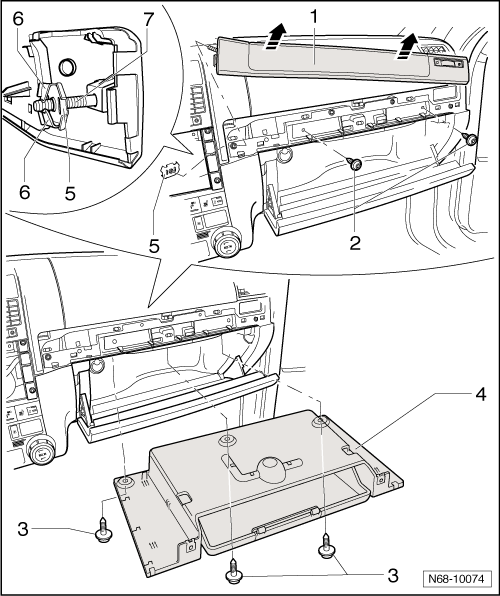
There are two variations of trim (1).
- Trim with stud (7) and lock washer (5).
- Trim without stud and lock washer.
Note
- Lock washer (5) is shown partially removed in figure for greater clarity. Installed, lock washer is accessible through radio system aperture but is not visible.
Reach into radio system aperture and determine by touch whether trim has a threaded stud (7) and lock washer (5).
Using a small screwdriver through radio system aperture, lever up tabs (6) of lock washer (5) and pull lock washer (5) off stud (7).
Note
- Ensure that lock washer does not fall into cockpit.
- Lock washer (5) is destroyed during removal. During assembly, it must be renewed.
- If trim without stud and lock washer are installed in vehicle, and trim is renewed with trim having stud and lock washer, remove securing clips in vicinity of stud before assembling.
- Check whether a securing clip is installed in middle of trim just as one is in vicinity of stud. If this is not the case, a securing clip must be added at this location.
- After trim (1) is installed, push new lock washer (5) on until it makes contact in the illustrated position (do not turn).
Pull trims (1) out of mountings in dash panel.
Remove the two bolts (2).
Remove the three bolts (3).
Remove vehicle wallet compartment (4) from glove compartment.
‹ Prev Removing and installing vehicle wallet compartmentNext › Removing and installing glove compartment lid
Parts & tools for this job For 2002 Volkswagen Touareg
- TOOLTrim removal tool kitSearch: trim removal tool kit
- PARTTouch-up paintSearch: Volkswagen touch up paint
- PARTPanel clip assortmentSearch: Volkswagen panel clips assortment
As an Amazon Associate we earn from qualifying purchases.