
Removing and installing camera control unit J852
- Make
- Volkswagen
- Model
- Touareg Mk2
- Year
- 2010–2018
- Section
- Lane departure warning › Removing and installing camera control unit J852
Removing and installing camera control unit J852
The camera control unit J852 and front camera for driver assist systems R242 form one unit and can only be removed and installed together.
Switch off ignition and all electrical consumers and remove ignition key.
Remove camera cover General body repairs, interiorRep. gr.68Compartments, covers and trim; Removing and installing camera cover.
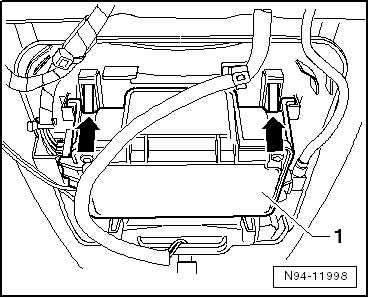
Press both catches (arrows) and pull control unit (1) upwards out of interior mirror retaining plate.
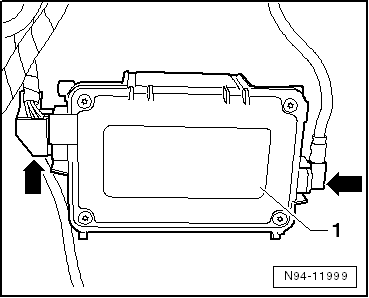
Release and disconnect both connectors (arrows) and remove camera control unit J852(1).
Installation is carried out in the reverse order. When installing observe the following:
Note
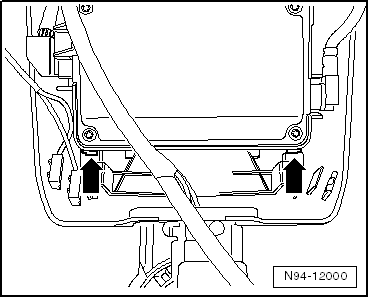
- When installing the camera control unit J852, make sure that the lower protrusions on the control unit housing (arrows) are inserted correctly in the guides on the retaining plate.
Remove camera cover General body repairs, interiorRep. gr.68Compartments, covers and trim; Removing and installing camera cover.
Calibrate camera control unit J852Chapter.
Parts & tools for this job For 2010 Volkswagen Touareg
- TOOLDigital multimeterSearch: automotive digital multimeter
- PARTAssorted fuse kitSearch: car fuse assortment kit
- TOOLWire crimper and connector kitSearch: wire crimper connector kit
As an Amazon Associate we earn from qualifying purchases.