
Removing and installing switches
- Make
- Volkswagen
- Model
- Touareg Mk2
- Year
- 2010–2018
- Section
- Front seats › Removing and installing switches
General body repairs, interiorRemoving and installing switches
Removing and installing switches
Note
- Removal and installation are described for the left vehicle side. Follow same instructions for the right side as appropriate.
The following switches are installed in the trim on the sill side:
- Driver seat lumbar support adjustment switch E176
- Driver seat adjustment operating unit E470
- Switch for driver multicontour seat E658
Switch off ignition.
Remove trim on sill side → Chapter.
Carefully release switch (1) from driver seat adjustment operating unit E470(7) using release tool T10236.
Release the catches and remove switch for driver multicontour seat E658(3) from panel.
Unscrew 2 screws (5) (0.7 ± 0.5 Nm) and take driver seat lumbar support adjustment switch E176(4) out of trim panel.
Unscrew 3 screws (6) (0.7 ± 0.5 Nm) and take driver seat adjustment operating unit E470(7) out of trim panel.
If necessary, remove cover (2) from panel.
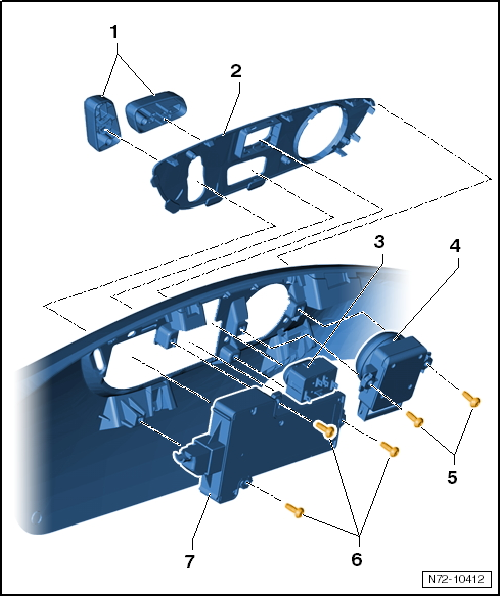
Installation is carried out in reverse order.
Parts & tools for this job For 2010 Volkswagen Touareg
- TOOLTrim removal tool kitSearch: trim removal tool kit
- PARTTouch-up paintSearch: Volkswagen touch up paint
- PARTPanel clip assortmentSearch: Volkswagen panel clips assortment
As an Amazon Associate we earn from qualifying purchases.