
Installing:
- Make
- Volkswagen
- Model
- Touran Mk1
- Year
- 2003–2015
- Section
- Multimedia system RSE › Installing:
Installing:
Route the cable connections as illustrated.
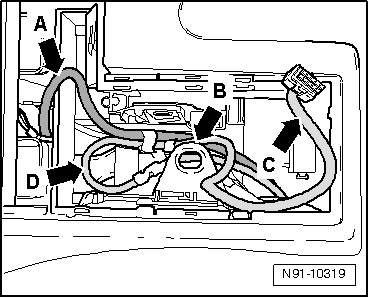
- “A” is the cable to the operating unit at the back in the centre console. It is essential for it to be routed above the plastic holder.
- “B”, route the cables as a loop under the holder of the DVD player.
- “C”, route the cable to the DVD player so it moves forwards when the DVD player is pushed into the centre console.
- “D”, route the surplus cable as a loop with the largest possible diameter, as illustrated.
Note
- The cable connections must be routed carefully, otherwise there will be problems with actuating the parking brake when the DVD player is installed.
Attach new fixing brackets to the stowage compartment.
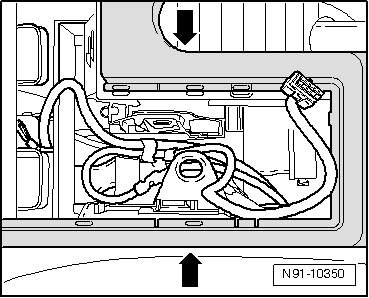
Push the stowage compartment with the built-in installation frame of the DVD player into the centre console, at the same time pressing the centre console together slightly with one hand (arrows). This generates a preload that ensures the fixing clips of the stowage compartment clip into the centre console securely.
Push the rubber stop buffer onto the DVD player (arrow). Connect the cable connection for the DVD player onto connection (A).
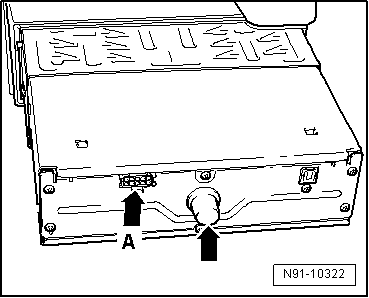
Carefully push the DVD player into the installation frame in the centre console. Whilst doing so, look through the mounting opening for the removed operating unit at the back of the centre console to check the cable connections are underneath the DVD player and correct the cable routing if necessary.
Provided the cables are routed correctly, push the DVD player into the installation frame until you hear it clip into place.
Then check the multimedia system functions correctly.
Parts & tools for this job For 2003 Volkswagen Touran
- TOOLDigital multimeterSearch: automotive digital multimeter
- PARTAssorted fuse kitSearch: car fuse assortment kit
- TOOLWire crimper and connector kitSearch: wire crimper connector kit
As an Amazon Associate we earn from qualifying purchases.