
Removing and installing “BETA” radio system
- Make
- Volkswagen
- Model
- Transporter T5
- Year
- 2003–2015
- Section
- “BETA” radio system › Removing and installing “BETA” radio system
Removing and installing “BETA” radio system
Note
- The part number for the radio can be found on a sticker on the radio housing.
- Obtain the radio code number from the customer before removing the radio. If the radio has to be renewed, it is essential to activate the anti-theft coding Operating manual. The customer must be informed of the new code number.
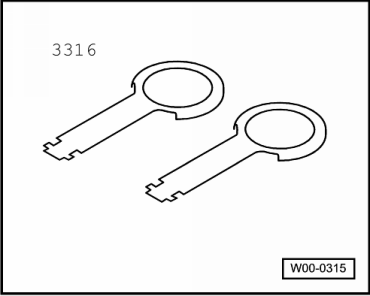
Switch off ignition and all electrical loads, and pull out ignition key.
Push radio release tools 3316 into the intended slots on left and right of radio until they engage audibly.
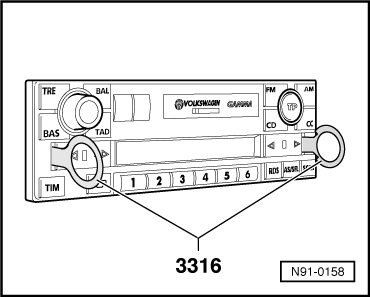
Pull out radio with radio release tools.
Release and disconnect connectors on rear of unit.
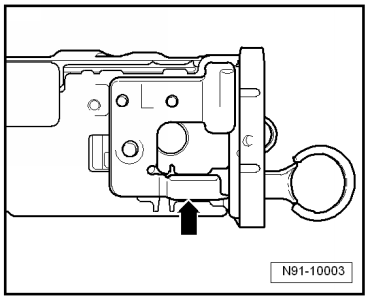
Press catch (arrow) on each side of unit and simultaneously pull release tool out of the removed unit.
Install in the reverse order of removal. When doing this, note the following:
Connect connectors to radio and engage them.
Warning Risk of damage to display and operating keys!
When inserting the radio system into the installation slot by pressing against the display or operating keys, the unit could become damaged.
When inserting the radio system never press against the display or operating keys.
Slide radio straight into the dash panel until it locks into place in the mounting frame.
Check coding of radio and re-code if necessary → Chapter.
Parts & tools for this job For 2003 Volkswagen Transporter
- TOOLDigital multimeterSearch: automotive digital multimeter
- PARTAssorted fuse kitSearch: car fuse assortment kit
- TOOLWire crimper and connector kitSearch: wire crimper connector kit
As an Amazon Associate we earn from qualifying purchases.