
Removing and installing bleeder
- Make
- Volkswagen
- Model
- Transporter T6
- Year
- 2015–2019
- Section
- Clutch operation › Removing and installing bleeder
‹ Prev Removing and installing clutch slave cylinder together with release bearingNext › Bleeding clutch mechanism
6-speed manual gearbox 0A5Removing and installing bleeder
Removing and installing bleeder
Removing line (4) and installing on bleeder (1)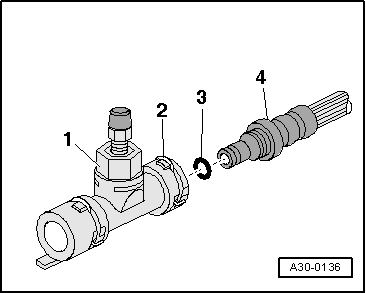
Release securing clip (2) with a screwdriver or pointed object to remove. Pull line (4) off bleeder connection (1).
To install, push line (4) with O-ring (3) onto connection of bleeder (1) until securing clip (2) engages audibly.
Test line by tugging on it.
Removing bleeder (4) from and installing on clutch slave cylinder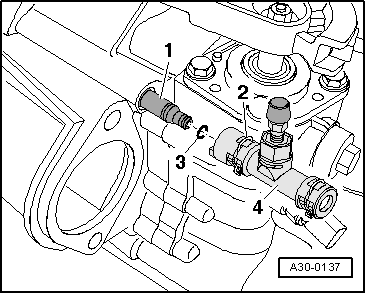
To remove, release securing clip (2) using a screwdriver. Pull bleeder (4) off clutch slave cylinder (1).
To install, check O-ring (3) on clutch slave cylinder. Press bleeder onto clutch slave cylinder connection until securing clip engages audibly.
Check by pulling on bleeder.
Bleed clutch mechanism → Chapter.
‹ Prev Removing and installing clutch slave cylinder together with release bearingNext › Bleeding clutch mechanism
Parts & tools for this job For 2015 Volkswagen Transporter
- PARTClutch kitSearch: Volkswagen Transporter 2015 clutch kit
- TOOLClutch alignment toolSearch: clutch alignment tool
- FLUIDGear oilSearch: Volkswagen Transporter manual gearbox oil
As an Amazon Associate we earn from qualifying purchases.