
Steering column unit - remove and install
- Make
- Volkswagen
- Model
- Up! Brazil-market up!
- Year
- 2014–2021
- Section
- Steering column › Steering column unit - remove and install
‹ Prev Handling and transporting the steering columnNext › Intermediate steering axle - remove and install
Running gear, axles, steeringSteering column unit - remove and install
Steering column unit - remove and install
Special tools and workshop equipment requiredTorque wrench V.A.G 1410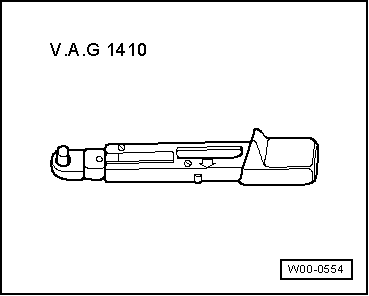
Remove the steering column → Chapter.
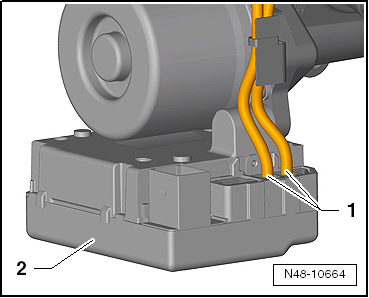
Separate the connections (1) from the steering column control unit J500(2).
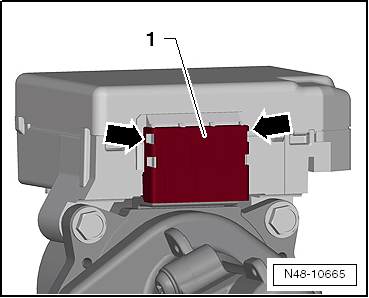
Remove the cover (1).
loosen the bolts (1).
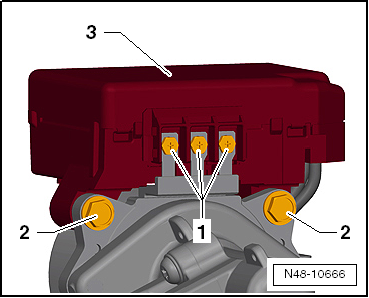
Remove the bolts (2) and remove the steering column control unit J500(3).
Note
- After removing the steering column control unit J500, do not place the steering column over the contacts (arrows) .
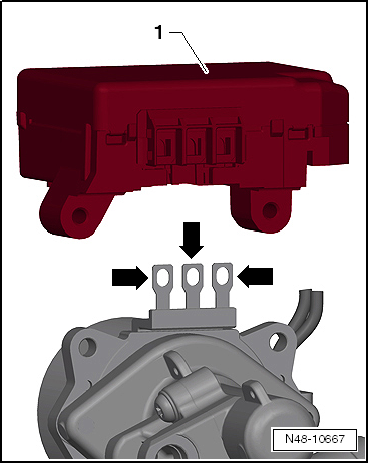
- This will damage the contacts and the steering column will have to be completely replaced.
Place the steering column control unit J500(1) properly over the contacts (arrows) .
Screw the bolts (1).
Thread and tighten the bolts (2) to the tightening torque.
Tighten the bolts (1) to the tightening torque.
Place and fit the new cover (1)(arrows).
Install the steering column → Chapter.
| Component | Tightening torque |
|---|---|
| Steering column control unit J500 on the support | 20 Nm |
| Steering column control unit J500 contact | 4 Nm |
‹ Prev Handling and transporting the steering columnNext › Intermediate steering axle - remove and install
Parts & tools for this job For 2014 Volkswagen Up!
- TOOLTie rod end toolSearch: tie rod end puller
- TOOLBall joint separatorSearch: ball joint separator
- FLUIDPower steering fluidSearch: Volkswagen power steering fluid
As an Amazon Associate we earn from qualifying purchases.