
Removing and installing rear LED module L259
- Make
- Volkswagen
- Model
- XL1 plug-in hybrid
- Year
- 2014–2016
- Section
- Tail lights › Removing and installing rear LED module L259
‹ Prev Removing and installing tail light MX3/ MX4Next › Removing and installing centre rear tail light unit MX13
Electrical systemRemoving and installing rear LED module L259
Removing and installing rear LED module L259
Note
- If the event of a defective LED, the entire LED module needs to be renewed.
Remove lower rear lid trim General body repairs, interiorRep. gr.70Luggage compartment trims; Assembly overview - lower rear lid trim.
Remove nuts (2).
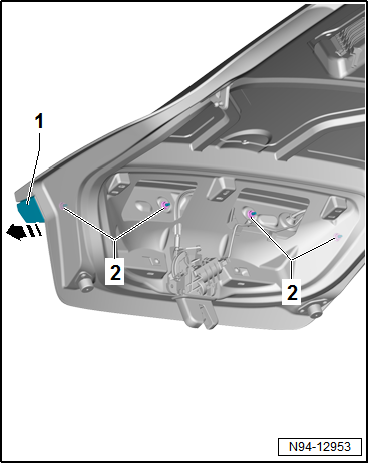
Pull off rear LED module L259(1) in (direction of arrow).
Disconnect connector.
Install in the reverse order of removal, observing the following:
- Chapter“Assembly overview - tail lights in rear lid”
‹ Prev Removing and installing tail light MX3/ MX4Next › Removing and installing centre rear tail light unit MX13
Parts & tools for this job For 2014 Volkswagen XL1
- TOOLOBD2 scannerSearch: OBD2 scanner
- TOOLDigital multimeterSearch: automotive digital multimeter
- TOOLBack-probe test leadsSearch: back probe test leads
As an Amazon Associate we earn from qualifying purchases.