
Brake Bleeding - WDS
- Make
- Aston Martin
- Model
- DB9 Factory Workshop Manual
- Year
- Issue 2, 2005
- Section
- Brake Actuation System › Brake Bleeding - WDS
- Install new ‘O’ rings to the brake fluid reservoir.
Lightly lubricate ‘O’ rings with brake fluid.
- Install the brake fluid reservoir to the master cylinder. Ensure correct location of the ‘O’ rings.
- Install the brake fluid reservoir securing pin. Torque to 4 Nm. (+/- 0.5 Nm.).
⚠ Warning ⚠
Brake fluid is hygroscopic. If kept in opened containers, it will absorb water vapour. Use only brake fluid from freshly opened containers when topping up the brake fluid reservoir.
- Fill the brake fluid reservoir with the specified brake fluid from a new, unopened container (Refer to ‘Specifications’, page 6-1-2).
- Bleed the brake system (Refer to ‘Brake Bleeding - WDS’, page 6-4-4).
Brake Bleeding - WDS
⚠ Warning
Avoid skin / eye contact or ingestion of brake fluid. If skin / eyes are splashed with brake fluid, rinse the affected area immediately with plenty of water and obtain medical attention. If brake fluid is ingested, obtain immediate medical attention.
Caution
Brake fluid must not be allowed to contact the vehicle paint work. Remove spilt brake fluid from the paint work by rinsing away with running water.
Use the WDS to bleed the brakes if bleeding the brake system after installing a major component, i.e. a modulator or master cylinder or when filling from empty.
If bleeding a caliper a manual brake bleed procedure can be used.
- Connect the WDS.
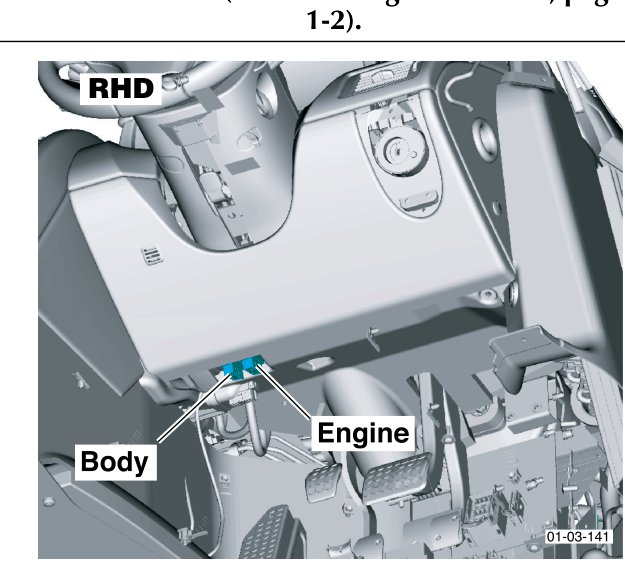
The diagnostic sockets, Body and Engine, differ for LHD and RHD vehicles (Refer to ‘Diagnostic Ports’, page 20-F2 1-2).
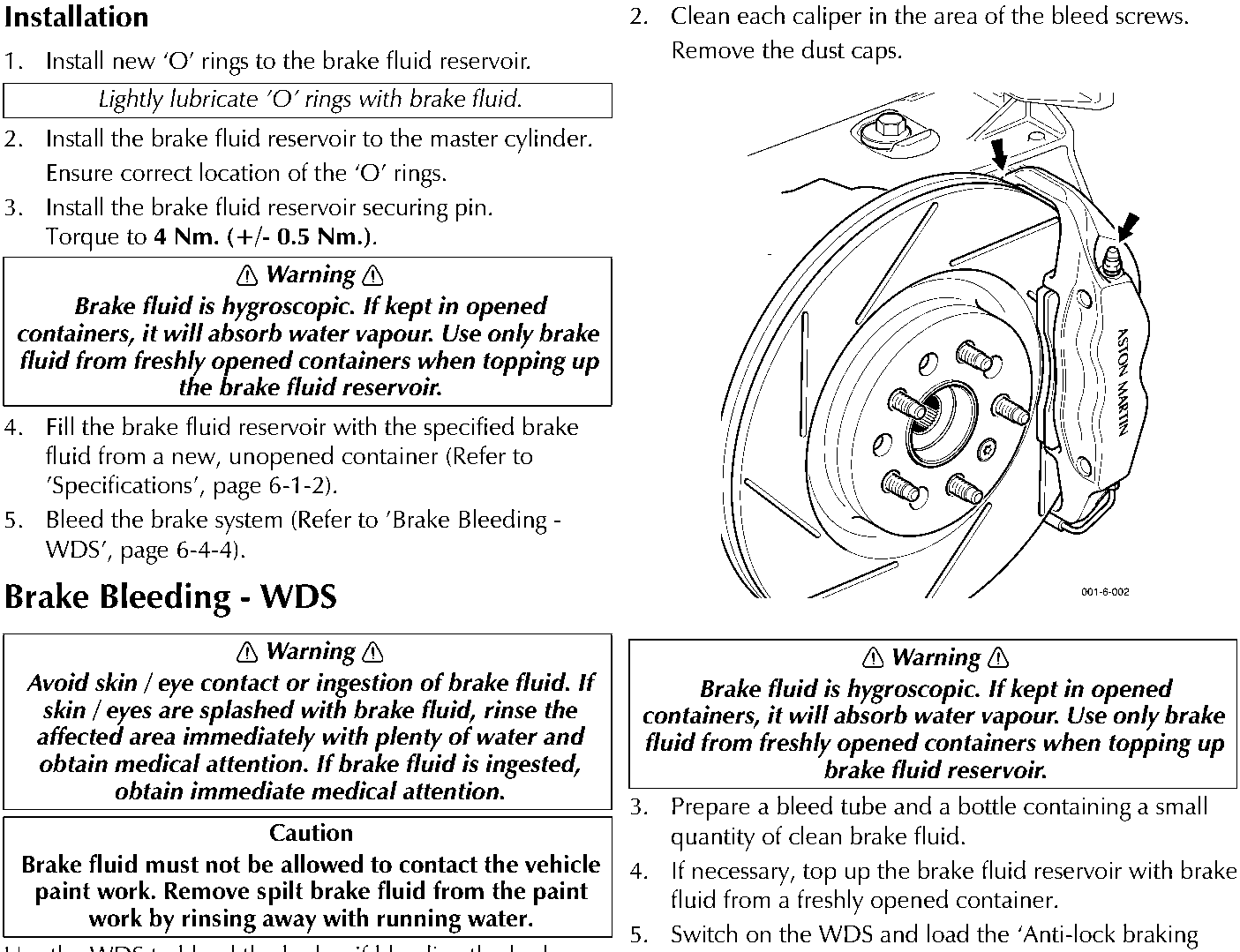
- Clean each caliper in the area of the bleed screws. Remove the dust caps.
⚠ Warning ⚠
Brake fluid is hygroscopic. If kept in opened containers, it will absorb water vapour. Use only brake fluid from freshly opened containers when topping up the brake fluid reservoir.
- Prepare a bleed tube and a bottle containing a small quantity of clean brake fluid.
- If necessary, top up the brake fluid reservoir with brake fluid from a freshly opened container.
- Switch on the WDS and load the ‘Anti-lock braking diagnostics’ software.
When bleeding a brake caliper always bleed the inner bleed screw first, followed by the outer bleed screw, then bleed the inner bleed screw once again.
- Select ‘Brake Bleed’ and follow the WDS instructions.
Brake Bleed - Manual
After a Caliper Replacement
Preparation
- Connect the bleed bottle tube to the bleed screws of front LH and rear LH calipers. Open the front LH and rear LH calipers bleed screws.
- Actuate the brake pedal (>60mm) and secure it by using a pedal support.
This closes the TMC central valves and prevents fluid flowing out of the opened brake system.
- Close the front LH and rear LH calipers bleed screws and remove the bleed bottle tubes.
- Remove the caliper. Install the new caliper.
- Remove the pedal support.
- Remove the brake fluid reservoir cap and fill the reservoir to ‘MAX’ with new DOT 4 brake fluid.
Parts & tools for this job For 2005 Aston Martin DB9
- PARTBrake padsSearch: Aston Martin DB9 2005 brake pads
- TOOLBrake bleeder kitSearch: one man brake bleeder kit
- FLUIDBrake fluidSearch: brake fluid
Links open Amazon search results in a new tab. As an Amazon Associate I earn from qualifying purchases.